← Back to the MP3 to MIDI converter
Why Your Free MP3 to MIDI Converter Always Sounds Out of Tune
It goes out of tune because the note was never steady to begin with, and a converter has to turn a moving pitch into one fixed key. During a guitar bend, a vocal slide, a vibrato tail, or any ornament, the real fundamental frequency travels continuously between semitones. Pitch detection reads the audio a frame at a time and rounds each frame to the nearest note of the twelve-tone scale, so the frames inside the bend get written down as "wrong" notes. Microtonal material gets pulled onto the nearest semitone for the same reason. This is what happens when continuous pitch is forced into discrete MIDI notes — not a shortcoming of free software, and not something a paid tier removes. Feed it clean piano or a steady synth lead and it barely happens; feed it a bent guitar or a melismatic vocal and it happens constantly.
Where the pitch actually breaks
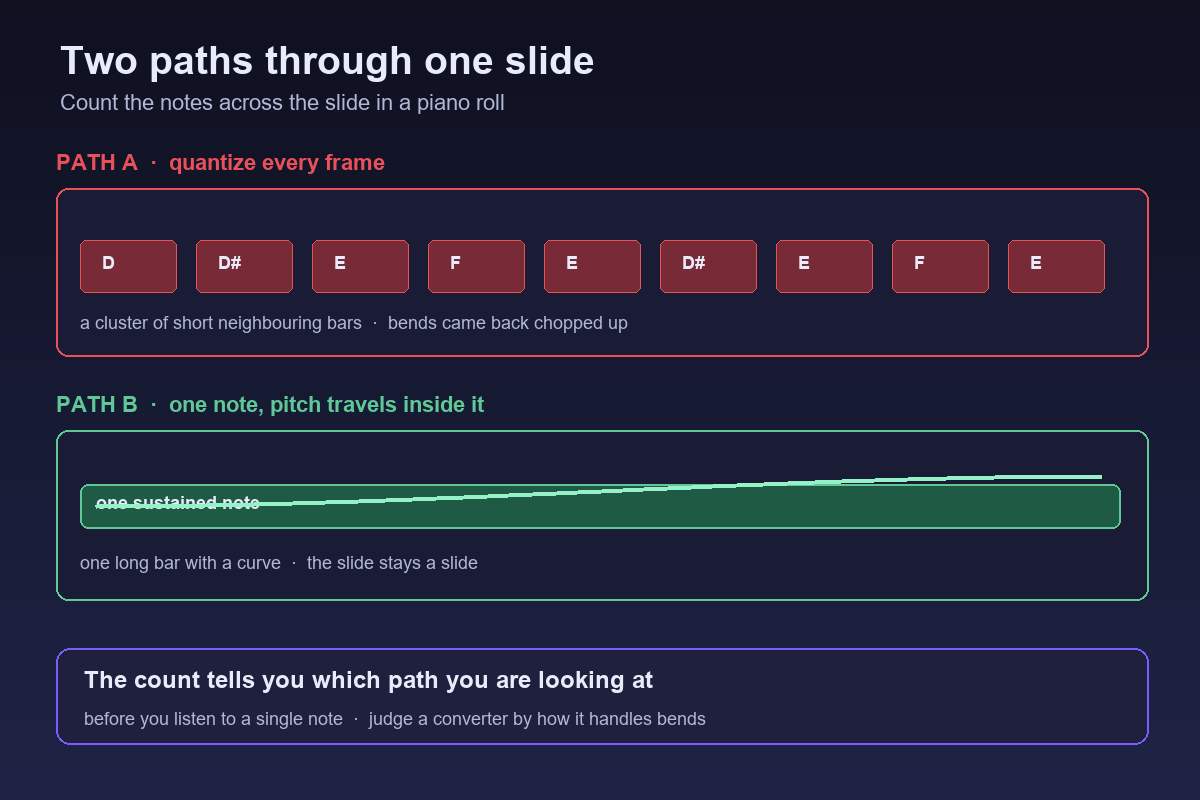
The chain is short: decode the file, estimate the fundamental frequency frame by frame, cut that continuous track into note events, snap each event to a semitone, write the .mid. The damage is in the third and fourth steps. A semitone grid has nowhere to put a frequency travelling between two keys, so every frame inside the bend is rounded to whichever key is nearest at that instant. Open the .mid in a piano roll and look for a tight cluster of fast alternating semitones sitting exactly where the player leans into or slides off a note. That cluster is a bend that got chopped up. It is not a timing problem and not noise on the recording, so re-converting the same file will reproduce it.
How to tell it was a bend, not a broken converter
Four checks you can run in a minute. The wrong notes cluster at the attack, the release, and the middle of a slide — they are not scattered randomly through the bar. They come in adjacent semitone pairs that flick back and forth, because the true pitch was crossing a boundary. Delete those few notes and the phrase suddenly sits closer to the original. Finally, run a clean single-note version of the same phrase through the converter: if that one comes back clean, the tool is fine and the source contains the bends. This matters because it stops you from cycling through converters looking for one that "isn't broken" — none of them will fix a slide that is in the audio.
The step the free tools skip
What the free converters leave out is not accuracy, it is a representation: there is no intermediate "this is a pitch bend" object between the frequency track and the note list. Every stable stretch is quantized straight to a note, and the moving stretches get quantized as if they were stable too. You can see it in the shape of the output — bends come back as several short notes instead of one note with a curve, and ornaments come back as clumps. And it is not corner-cutting by free products specifically: the same absence shows up in paid converters, because modeling bends properly is a separate, harder problem that most single-line melody extractors simply do not attempt. So judge a converter by whether it does anything at all with bends, not by whether it charges. Free versus paid is the wrong axis here.
What the two paths actually produce
Sort the tools by what they do with a long slide, not by name. One path reads a frequency per frame and quantizes it; on a sustained vocal slide it gives you a run of short neighbouring keys, because each frame is rounded on its own. On a fast ornamental run that same path gives you back fewer notes than were played, with the grace notes folded into the nearest long one. The other path keeps a single note and lets the pitch travel inside it, so the slide stays a slide; on a dense run it still needs every ornament placed by hand, so the work grows with the number of notes. Count the notes across the slide in a piano roll: a cluster of short bars on one side, one long bar with a curve on the other. That count tells you which path you are looking at before you listen to a single note.
What to do with the file in front of you
Work in this order. Find the bend positions in the piano roll or spectrogram and correct those notes by ear, leaving the rest of the phrase alone. If the source is yours, re-record or pick a cleaner take with less vibrato and fewer slides — a clean piano single note or a steady synth lead converts far better than a bent guitar or a soul vocal. For passages where the bend itself matters, a single-note pitch editor gives you manual control over the curve, which is the only way to keep the bend instead of flattening it. For dense blues, soul, or microtonal material, accept that the output is a sketch: keep the notes that landed, rebuild the bent phrases yourself, and don't spend the afternoon hunting for a converter that won't do this. It is a limit of pitch detection, and the tools that handle it best are the ones that let you edit the curve.