Average of your taps, measured in your browser. Nothing is uploaded — the math runs on your device.
Tap four times in time with the music — the number appears on the fourth tap.
How this pad counts
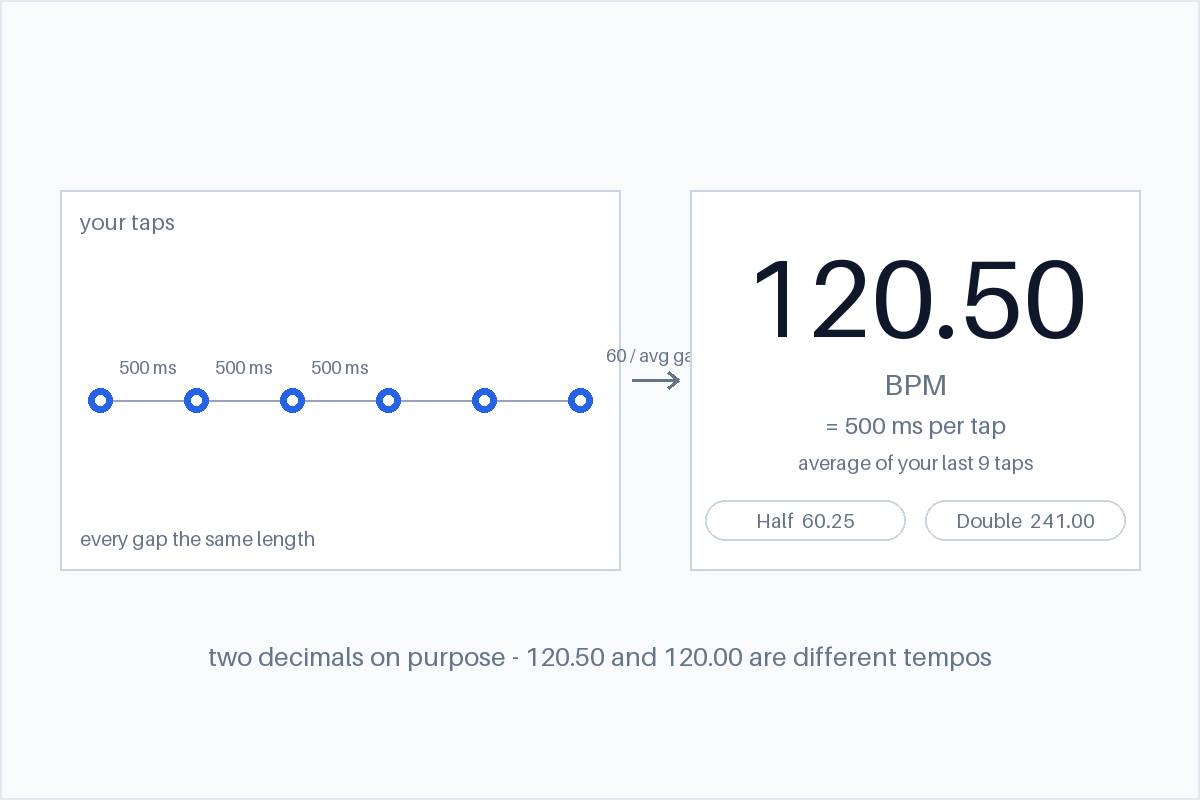
Each tap is timestamped in your browser. BPM is 60 divided by the average time between your taps, taken over a rolling window of your last nine taps — so the first number appears at tap four, and every tap after that refreshes it. A rolling window rather than a single gap means one sloppy tap barely moves the reading, and the number follows you if the track drifts.
The result is reported to two decimal places on purpose: 120.50 and 120.00 are different tempos when you are lining up a loop or a DAW grid, and rounding would hide that. Accidental double-taps closer than 80 milliseconds apart are ignored — no musical beat is that fast, and a bounced mouse should not corrupt the average.
Why an auto-detected BPM is often wrong
Upload a track to an automatic BPM detector and the number it returns is only as good as the pulse it locked onto. Four failure modes cover most of the wrong answers, and we have hit every one of them in our own testing:
1. It locks onto the wrong layer of the drum pattern
Onsets are not beats. A drum pattern has kick, snare, hats and eighth notes, and a detector often locks onto the eighth-note or snare layer instead of the quarter-note pulse you feel. In our tests on real full productions, the onset detector settled on 5.6 to 5.9 peaks per second — and the median-gap method turned that into 252 BPM on a track labelled 150, and 195 BPM on a track labelled 100. Every one of those peaks was a real onset. None of them was the beat.
2. It lands an octave away
Patterns repeat symmetrically, so a tempo can be reported at exactly half or double its true value. An early version of our own detector reported 87.5 for a 175 BPM test track — the periodicity peak was real, just at twice the period. If a detector’s answer is exactly half or double what you feel, that is usually what happened, which is why the Half and Double buttons are right above.
3. Short material does not repeat enough
A grid-based check needs the beat to recur often enough to prove it is the beat. On two short test loops our grid-consistency measure read 0.41 against its 0.50 threshold, and the tool correctly refused to guess instead of printing a number. Anything under about ten seconds — a two-bar loop, an exported snippet — sits in that danger zone.
4. The track does not hold one tempo
Live drums drift, electronic tracks sometimes swing or push the backbeat, and rubato has no single BPM at all. A detector has to commit to one number for the whole file; your ear can follow the beat you actually feel.
None of this makes automatic detectors useless — it makes their output a starting point. When the number looks wrong, the fastest check is the pad above: tap the beat you feel and compare.
How to calibrate the offset by hand
“Offset” is the gap between your taps and the actual beat. It is the main reason a hand-tapped BPM reads high or low, and it is fixable in four moves:
1. Tap on the beat, not ahead of it
Anticipation is the most common offset error. Tapping slightly before the hit lands shortens every measured interval, so the average reads fast; tapping late reads slow. Tap as the hit lands — if you are nodding your head, tap when your head is all the way down, not on the way.
2. Start on a downbeat and let the average settle
Begin tapping on a clear downbeat, then keep going. The pad averages your last nine taps, so one mistimed tap barely moves the number — that is the point of the window. If the first readout looks off, tap for another bar before trusting it.
3. If it is exactly double or half, you are on the wrong layer
60, 120 and 240 can be the same pulse tapped on different layers. If the number is exactly 2× or ½ what the song feels like, retap on the other layer — or use the Half and Double buttons to slide the value without retapping.
4. Carry the phase into your DAW, not just the number
BPM is only half of a tempo setting; the grid also has a phase offset from the audio. When you set a click or grid in a DAW, anchor beat one to the track’s first downbeat rather than the first sample of the file, or every bar will line up while the whole grid sits shifted against the music.
Questions people ask
Why does it need four taps?
Three intervals is the minimum for an average that is not just “one gap” — a single interval is far too jittery to trust. After the fourth tap, every additional tap refreshes the number from your last nine taps.
Why two decimal places instead of a whole number?
Because the decimals are the point when you are matching a loop or a grid: 120.50 and 120.00 drift apart audibly within a few bars. The pad reports what you tapped, to two decimals, instead of rounding it away.
My BPM is exactly double or half the song — is the tool wrong?
No — you tapped on a different layer of the beat (half-time or double-time). Both readings describe the same pulse. Use the Half and Double buttons to convert, or retap on the layer that matches what you feel.
Does this page upload or record my taps?
No. The timestamps and the averaging both stay in your browser; this page makes no network requests with your taps. Nothing is stored between visits.