← Back to the MP3 to MIDI converter
Why does MP3 to MIDI sound out of tune?
Because a converter has to round a continuously moving pitch into semitone note events — any note that bends, slides or wobbles gets snapped to the nearest semitone, so it lands sharp or flat even when the pitch was detected correctly. This is a limit of note-based MIDI itself, not a bug and not something that paying money removes.
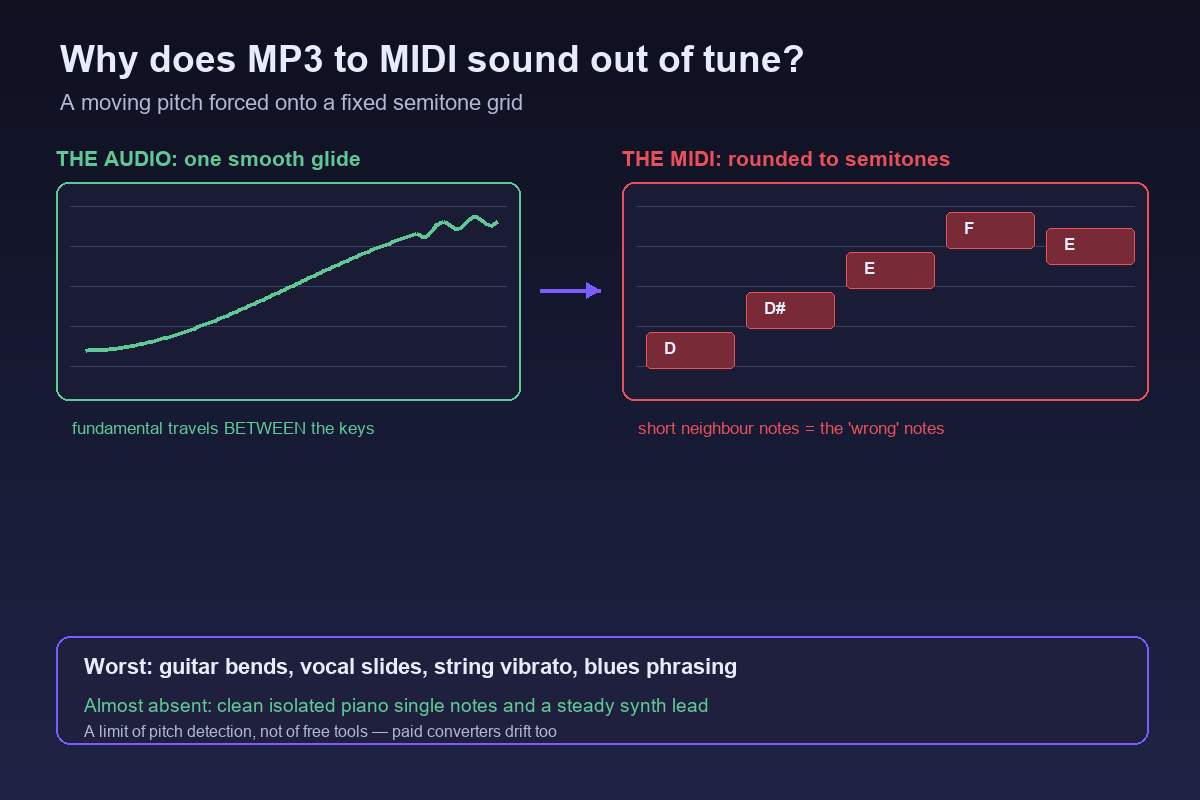
Why the notes land out of tune
Real performances almost never sit on one perfectly steady pitch. Singers slide into notes and add vibrato, guitarists bend strings, string sections wobble, and ornaments glide between notes. A pitch detector hears all of that movement correctly — the trouble starts at the moment it has to write a MIDI note.
MIDI note numbers are whole semitones: 60, 61, 62. A note bending a quarter tone sharp or a slide passing between the semitones has no note number to land on, so the detector rounds each measured frame to the nearest one. During a bend, the true pitch travels a staircase of in-between values, and the rounded result is a staircase of "wrong" notes. That staircase is the out-of-tune sound you hear. Vibrato does the same thing more gently: frames at the edges of the wobble round to the semitone above and below, which comes back as a warble. The distance from a measured pitch to the nearest semitone is measured in cents, and you can see that offset for any frequency with our Hz to note converter.
MIDI can carry continuous pitch only through separate pitch-bend events, and simple one-line converters do not write them — they write note events. So even a flawless detector produces quantized output. Quarter-tone music (blues blue notes, Arabic maqam, Indian shruti ornaments) is the extreme case: the material sits deliberately between the semitones that note events can represent.
One myth worth killing: it is not the MP3. Lossy compression adds artifacts, but the tuning drift above happens after decoding, on the way from measured pitch to note events. The same performance saved as a WAV transcribes with the same drift.
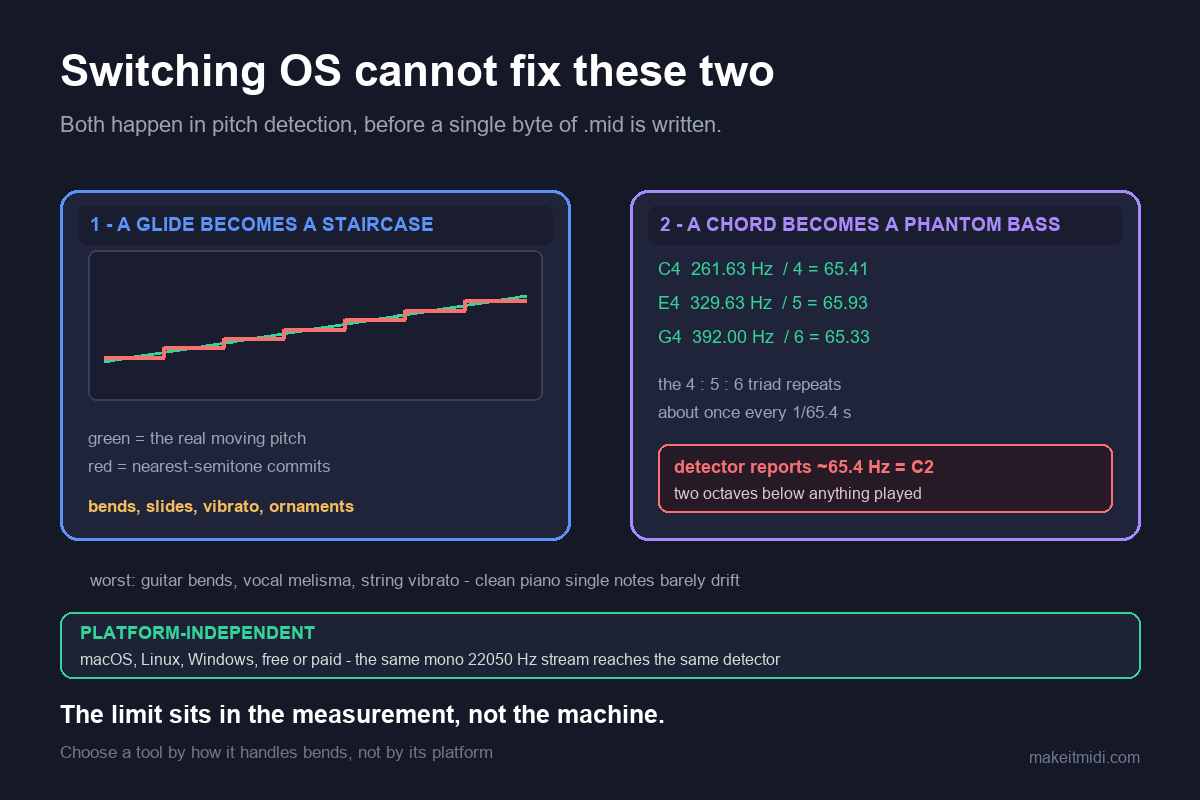
When it is worst — and when it is basically fine
The drift is predictable. If the pitch travels, expect it:
Almost always out of tune
- Guitar bends, string bends, and wide vibrato
- Vocal slides, runs, and melisma
- Blues and soul bent "blue" notes
- Sustained string-section vibrato
- Quarter-tone and microtonal music
- Anything with heavy continuous pitch movement or pitch effects
Basically fine
- Clean solo piano with steady tuning
- A stable synthesized lead with a fixed pitch
- Plucked tones with fast decay
- Any single line recorded direct, without pitch effects
A rough test before you convert: if you can hum the line as steady steps, it will transcribe well. If the pitch travels while you hum it, expect drift and budget time for fixing.
How to get something usable anyway
1. Feed it a cleaner source
An isolated stem, a single instrument, or a direct recording removes everything that competes with the line. This does not remove bends, but it removes the second-biggest reason output sounds wrong (overlapping voices) and makes the pitch drift you do get easier to spot.
2. Look at where the pitch glides
Desktop transcription tools that show a spectrogram or piano roll alongside the audio make the glides and grace notes visible — users of one such tool (NoteGrabber) recommend it in production forums for exactly this, because you can see which spots will need fixing before you hear them. Knowing where the pitch travels turns "the whole thing sounds off" into "these eight notes are off".
3. Fix the offending notes by ear
Notes in a .mid file are editable in any DAW or notation program. Snap the bent notes to the semitone you actually hear, or accept the contour and rewrite the melody by ear. The transcription gives you rhythm, contour, and a skeleton; the tuning pass is you.
4. For a single melodic line, use a pitch editor
In production communities, the advice for one-line material consistently points to full pitch editors — Melodyne is the name that comes up most, with the caveat that it takes practice — rather than batch transcribers. If a single melody is the whole job, a tool built for editing individual notes will beat any converter.
5. Judge a tool by how it treats pitch bends, not by price
Browse the forums and the pattern is hard to miss: the complaints about out-of-tune output attach to free browser tools and the $80 desktop options alike. Even the paid tools people rate most highly put the correction work on you. Choose by running a bend-heavy clip of your own through a trial and checking what it does with the bends — not by whether it is free.
6. Reframe the job for bend-heavy material
For a soulful vocal, a blues guitar, or a sliding string line, no semitone-note converter will hand you something in tune. Treat the output as a draft — rhythm, contour, and an arrangement skeleton — and fix the pitch by ear. The converter's job is to get you 80% there in seconds, not to finish the last 20%.
What this means for MakeItMidi
This converter runs entirely in your browser — no upload, no account — and extracts one melodic line from your audio, writing it as a Standard MIDI File (format 0, single track, 480 ticks per quarter note, 120 BPM). It writes note events; it does not transcribe pitch bends. On clean, single-line sources it gives you an immediately usable line. On bend-heavy material expect exactly the drift described above, and plan to correct it.
No accuracy percentage is published here on purpose. The honest answer is that the result depends entirely on the source you feed it, and any number we printed would be a guess. What we can state plainly is how the output is built and where its limits sit — the rest you can verify in minutes with your own file.