← Back to the MP3 to MIDI converter
Can You Convert a WAV File to MIDI?
Yes — a WAV converts to MIDI the same way an MP3 does, and the fact that WAV is lossless does not make the resulting notes any more accurate: the limit is in turning a moving pitch into fixed semitone events, not in how the audio was stored.
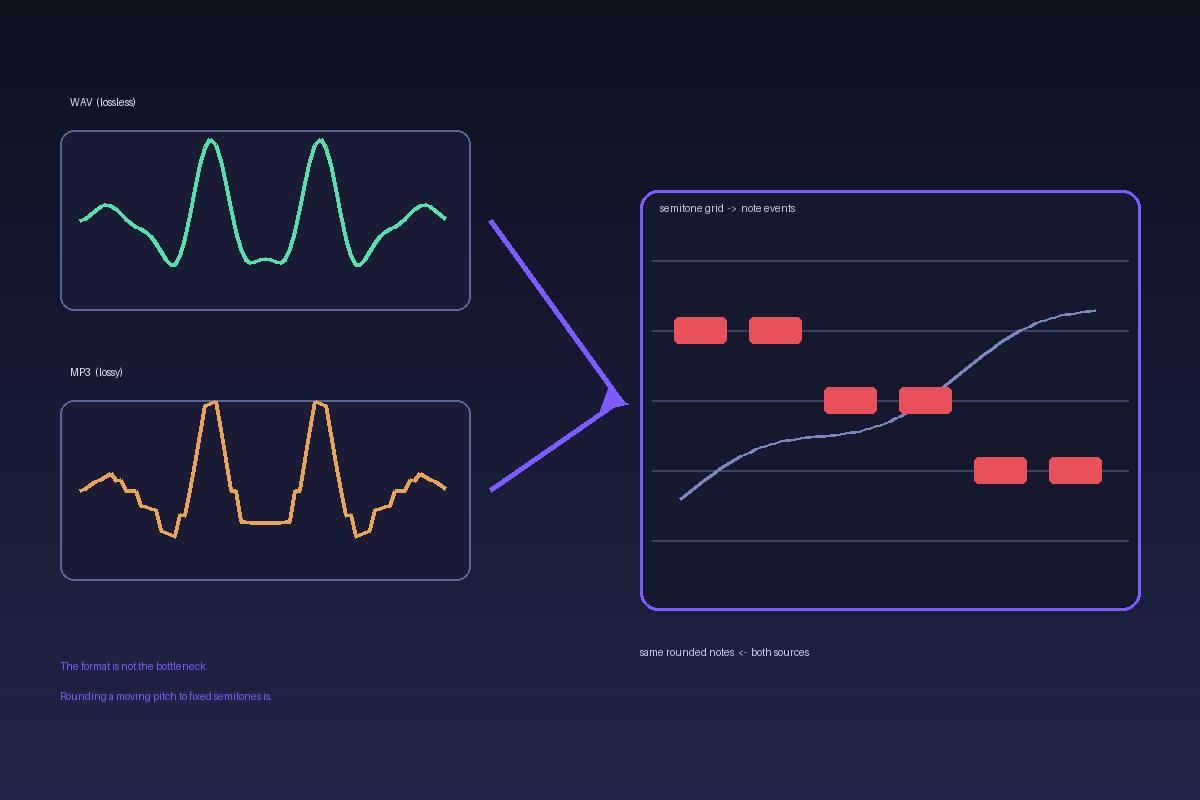
Yes — WAV is supported, and it works the same way
The converter decodes whatever the browser can decode: MP3, WAV, OGG, M4A/AAC and FLAC all go through the same path. Once decoded, the file is just a stream of samples; the pitch detector reads that stream frame by frame and writes note events. It does not care which container the samples arrived in. Decoding and pitch detection run inside your browser — the audio is never uploaded, there is no account and no login, and you download the .mid directly. The code sets no file-length or file-size limit; only your device memory does.
Why "lossless" does not make the MIDI more accurate
This is the part most people get backwards. Lossy compression throws away some waveform detail, so it is reasonable to expect a WAV to transcribe better. It usually does not, because the errors you hear in converted MIDI are not compression artifacts — they happen after decoding, when a continuously moving pitch has to become one discrete note number.
MIDI note numbers are whole semitones. During a guitar bend, a vocal slide, vibrato, or any ornament, the true fundamental frequency travels between those semitones. The detector has to round each frame to the nearest note, so the frames inside the bend get written down as the "wrong" notes. Microtonal material gets pulled onto the nearest semitone for the same reason. A WAV preserves the bend perfectly — and that is exactly the problem: it delivers the bend intact to a step that can only represent fixed notes. A cleaner waveform gives the quantizer a clearer signal to round, not a different answer. This is a limit of note-based MIDI itself, not of the file format and not of free tools; people report the same drift on paid converters. Pick a tool by how it handles bends, not by whether it is free.
What actually changes with WAV
- Nothing about tuning. Bends, slides and vibrato quantize the same way in WAV and MP3.
- Very little about detection. A heavily compressed, artifact-heavy MP3 can add noise to the pitch estimate, but the large, audible errors almost always come from the semitone grid, not the codec.
- File size. WAV is bigger to store and move around, which matters for your disk, not for the note list that comes out.
Output is a Standard MIDI File (SMF) format 0, single track, 480 ticks per quarter note, 120 BPM — the same file whatever you fed in. It extracts one melodic line, not a full multi-instrument or chord separation. No accuracy percentage is published here, because it depends entirely on the source; any number printed would be a guess.
How to convert a WAV file to MIDI
- Open the converter and drop your WAV anywhere on the page (or pick the file). It stays on your device.
- Let the local decoding and pitch detection finish — nothing is sent to a server.
- Download the
.midand open it in any DAW or notation editor. - Open a piano roll and look for tight clusters of alternating semitones at the start, release, or middle of a slide. Those are bends that got chopped up — snap them back to the note you actually hear, or rewrite the phrase by ear. A bend-heavy take is a draft, not a finished transcription.