← Back to the MP3 to MIDI converter
How does audio to MIDI work?
It works by transcription, not by a format swap: the software decodes your recording, estimates the pitch of each short slice of audio, groups those pitches into notes, and writes them out as a Standard MIDI File. The step that surprises people is the middle one — a detector can only round a moving pitch to whole semitones, which is also why bends and slides come out off.
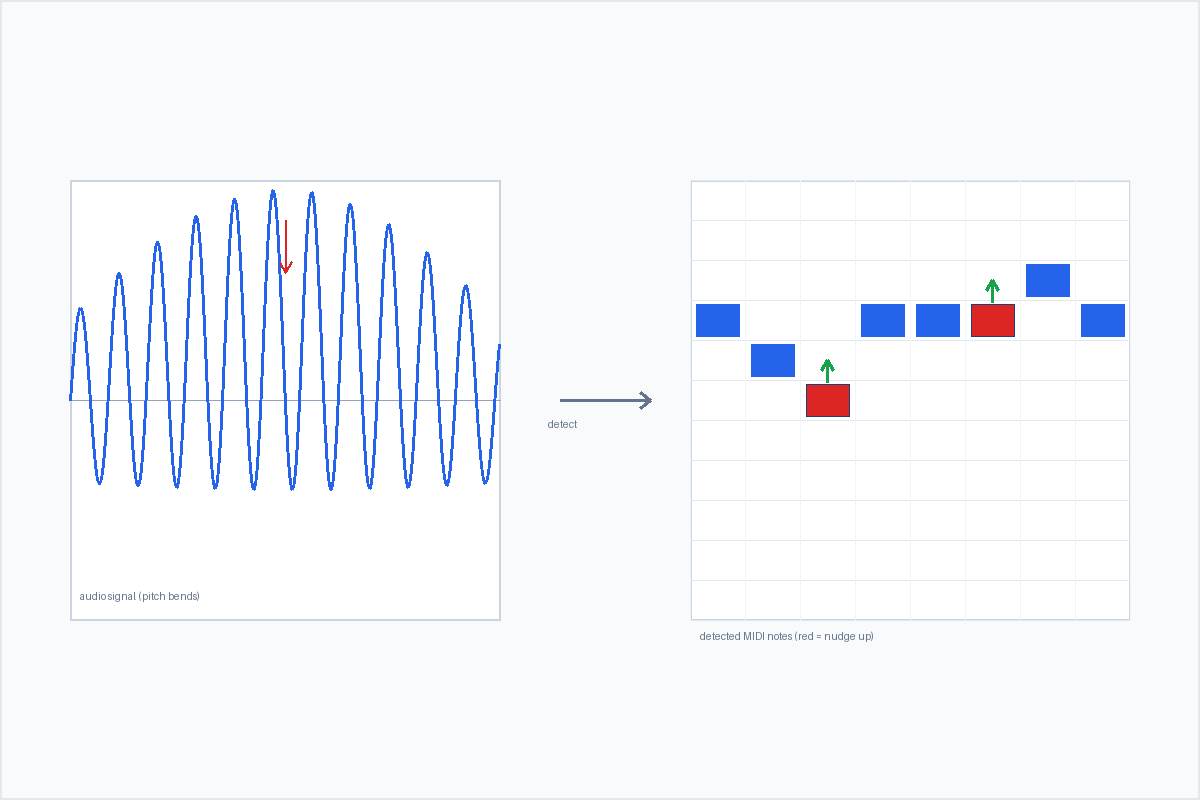
The pipeline, step by step
- Decode. The audio file is read into raw samples. A browser-based converter does this with the Web Audio API, so the file is decoded on your device and never uploaded.
- Frame it. The samples are chopped into many short, overlapping windows — a few milliseconds each. Pitch is estimated per window, because pitch changes over time and the detector has to catch that movement.
- Detect the pitch. Each window is analysed for a fundamental frequency — typically with a YIN-style or autocorrelation method that asks "what repeating period is in this slice of sound?" That gives a number in hertz, not a note name.
- Group into notes. Consecutive windows that land on the same pitch are merged into one note, with a minimum length so that momentary flicker does not become a stray note.
- Write the file. Each note becomes a MIDI note-on / note-off pair and is packed into a Standard MIDI File.
This is exactly what the converter on this site does. It runs the whole chain in your browser, extracts one melodic line (a monophonic detector tracks a single pitch at a time), and hands you a Standard MIDI File you can open and edit anywhere.
The pitch step is where it gets interesting
Step 3 is the whole game, and it is also where "audio to MIDI" earns its reputation for going out of tune. MIDI note numbers are whole semitones — 60, 61, 62 — but real performances almost never sit still on one pitch.
When a note bends, slides, or carries vibrato and grace notes, its instantaneous fundamental frequency moves continuously. The detector measures that motion correctly, then has to write a semitone note for each slice — so during a bend the true pitch travels through values with no note number, and the rounded result becomes a staircase of "wrong" notes. Microtonal intervals that sit outside twelve-tone equal temperament get hard-snapped to the nearest semitone for the same reason. This is a property of note-based MIDI and of pitch detection itself; it is not a bug and it is not removed by paying for a tool.
Where it bites hardest:
- Almost always off: guitar string bends and wide vibrato, vocal slides and runs, sustained string-section vibrato, blues and soul bent "blue" notes, and any quarter-tone or microtonal material.
- Basically fine: clean solo piano with steady tuning, a stable synthesized lead at a fixed pitch, plucked tones with fast decay, and any single line recorded direct without pitch effects.
How to deal with it:
- See the glides before you fix them. Tools that show a spectrogram or piano roll next to the audio make the bend points visible, so you know which notes will need a nudge. In production forums, users of tools like NoteGrabber point to exactly this — you can spot the off spots before you hear them.
- Feed it a cleaner source. An isolated stem or a single direct-recorded instrument removes competing voices and makes any remaining drift easy to isolate.
- Use a pitch editor for one line. For a single melody, full pitch editors (Melodyne, in single-note mode, comes up most often) beat any batch converter — but they take practice.
- Treat bend-heavy output as a draft. On a soulful vocal or a blues guitar, no semitone-note converter will hand you something in tune. Take the rhythm and contour it gives you and finish the pitch by ear.
One thing worth saying plainly: the complaints about out-of-tune output in those same forums attach to free browser tools and to paid desktop options (the $80 ones included). Nobody is mad that the free one is "not good enough" — the paid one bends too. Judge a tool by what it does with pitch bends on your own clip, not by whether it is free.
What the output actually is
The result is a Standard MIDI File (SMF) format 0: a single track, 480 ticks per quarter note, 120 BPM, containing the detected melody line only. It is not the sound — it is a list of note events, so you can reopen it in any DAW or notation program (Ableton, Logic, FL Studio, GarageBand, MuseScore, and others) and do the normal MIDI things: change the instrument, fix a wrong note, quantise the timing.
Two honest caveats that follow directly from the pipeline above:
- It is not multi-instrument separation. A monophonic detector follows one pitch at a time, so a dense mix comes back as an approximation of the loudest line, not every part notated.
- No accuracy percentage is claimed. Because the result depends entirely on the source you feed it, any number printed here would be a guess. What can be stated plainly is how the output is built and where its limits sit — the rest you can verify in minutes with your own file.
Why doing it in the browser changes the trade-off
Most converters ask you to upload the audio to a server. Doing the decode and detection in the browser flips that:
- No upload, no login, no server. The audio is read locally and this page makes no network request carrying your audio. You convert and download a
.midwithout an account. - Wide format support. Anything the browser can decode works — typically MP3, WAV, OGG, M4A / AAC, and FLAC.
- No length or size cap written into the code. How much you can process is limited by your device's memory, not by a hard limit in the page.
That is the whole mechanism: decode, frame, detect pitch, group, write — with the rounding step being the reason some notes come back bent, and the browser being the reason your audio never leaves your machine.