← Back to the MP3 to MIDI converter
MP3 to MIDI converter
An MP3 to MIDI converter reads an audio file and writes out a Standard MIDI File of the melody it detects — and on this site that happens entirely in your browser, with no upload and no login.
What an MP3 to MIDI converter does
It turns sound into a list of notes you can edit, instead of audio you cannot pull apart. You give it a recording, and it returns a .mid file containing the melody it detected. MIDI is not audio — it is a sequence of note events — so the file is tiny and opens in any DAW or notation program.
This site's converter runs in your browser. The audio is decoded and analyzed on your device; nothing is uploaded and there is no account to sign in to. You drop an MP3 (or WAV, OGG, M4A/AAC, or FLAC) and get a Standard MIDI File (SMF) format 0: a single track, 480 ticks per quarter note, at 120 BPM. The file holds the detected melody line only.
One thing worth stating plainly: it extracts one melodic line from the audio. It is not separating the instruments in a mix, and it is not writing out every part. There is no file-length or size limit written into the page — only whatever your device's memory allows. That is the whole machine, which is why the output is honest and fast rather than magic.
How to convert MP3 to MIDI (3 steps)
1. Choose the file
Drag an audio file onto the converter, or click it and pick one from your device. The page shows the file name and size once it is loaded. The file never leaves your machine.
2. Convert
Press Convert to MIDI. The file is decoded into raw audio samples in your browser, read in short overlapping frames, and each frame is checked for a fundamental pitch. Frames that hold the same pitch are grouped into one note, with a minimum length so flicker does not become a note.
3. Download
Press Download .mid. You get the Standard MIDI File described above — open it in any DAW or notation program (Ableton, Logic, FL Studio, GarageBand, MuseScore) or press Copy notes to grab the note list as text. No account, no upload, no server was involved at any step.
Why converted MIDI can come out "out of tune" — and what to do about it
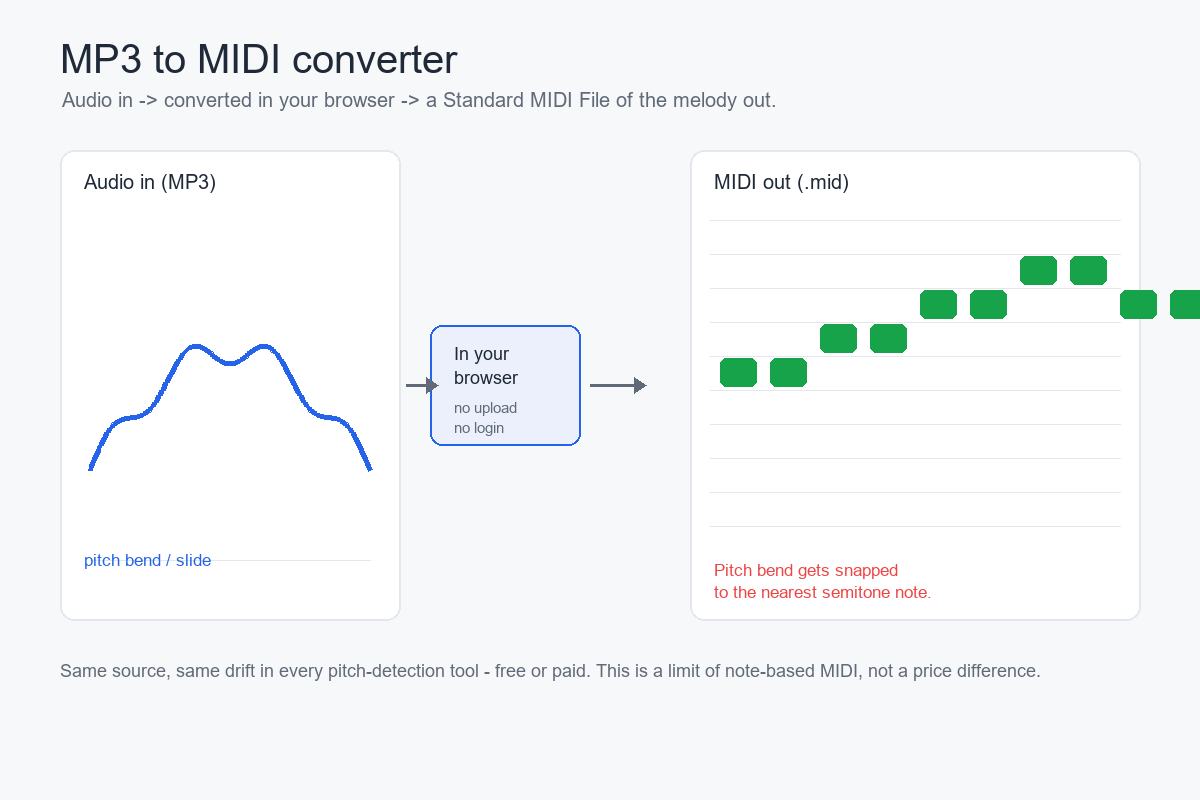
This is the part that surprises people, and it applies to most pitch-detection tools — any converter that writes only semitone-quantized note events, AI-labeled or not. (A few, like Spotify's open-source Basic Pitch, also emit MIDI pitch-bend to follow the continuous pitch; this site's converter writes note events only, so the rounding below still applies here.) A detector that only emits note events has to round a continuously moving pitch into discrete semitone note events. When the source bends, slides, or wobbles, the rounded result lands sharp or flat even when the pitch was detected correctly.
Why it happens. Pitch bends, glissando, and grace notes make the instantaneous fundamental frequency change continuously. There is no MIDI note number for "a quarter tone sharp," so the detector snaps each measured frame to the nearest semitone. During a bend the true pitch travels a smooth line between notes, and the rounded result is a staircase of "wrong" notes. Vibrato does the same thing gently: frames at the edges of the wobble round to the semitone above and below, which comes back as a warble. Microtonal inflections — blues blue notes, Arabic maqam, Indian shruti ornaments — sit deliberately between the semitones note events can represent, so they are snapped every time.
When it is worst. Guitar bends and wide vibrato, vocal slides and runs, sustained string-section vibrato, blues and soul bent notes, and any quarter-tone or microtonal playing come out off almost by definition. The flip side is predictable too: a clean solo piano with steady tuning, or a stable synthesized lead at a fixed pitch, comes out fine, because the pitch does not travel.
What to do. Look at the detector's output around the slide and ornament spots and nudge those few notes by ear; pick the cleanest take you have; run a single-note correction pass in an editor built for one-line material (Melodyne's monophonic mode is the name that comes up most in production forums); or simply accept that bendy material transcribes as a draft and finish the last stretch yourself.
The point that gets lost in comparisons: this is a fundamental limit of note-based pitch detection, not "the free version isn't good enough." Browse producer forums and the complaints about out-of-tune output attach to free browser tools and the $80 desktop options alike — the paid tools people rate most highly still put the correction work on you. Nobody there blames the price. So judge a converter by how it treats pitch bends on your own material, not by whether you paid.
What you can open the MIDI with
Any DAW or notation app that imports Standard MIDI Files: Ableton, Logic, FL Studio, GarageBand, MuseScore, and others. Once it is in your project you can re-instrument the track, quantise the timing, or edit note by note.
If you want to work in a specific app, the route that holds everywhere is the same: convert to .mid first, then import the .mid. We do not claim a given app has audio-to-MIDI built in, because that depends on the version and changes over time — converting to a MIDI file and importing it is the step that is true in every editor, so it is the one we recommend. (This site itself does not offer batch conversion, login, or a history of past files.)