← Back to the MP3 to MIDI converter
Can I convert MP3 to MIDI without signing up?
Yes — there is no account to create, no email to hand over and no login: the audio is decoded and analysed inside your browser, never uploaded, and you download the .mid file directly when it is done.
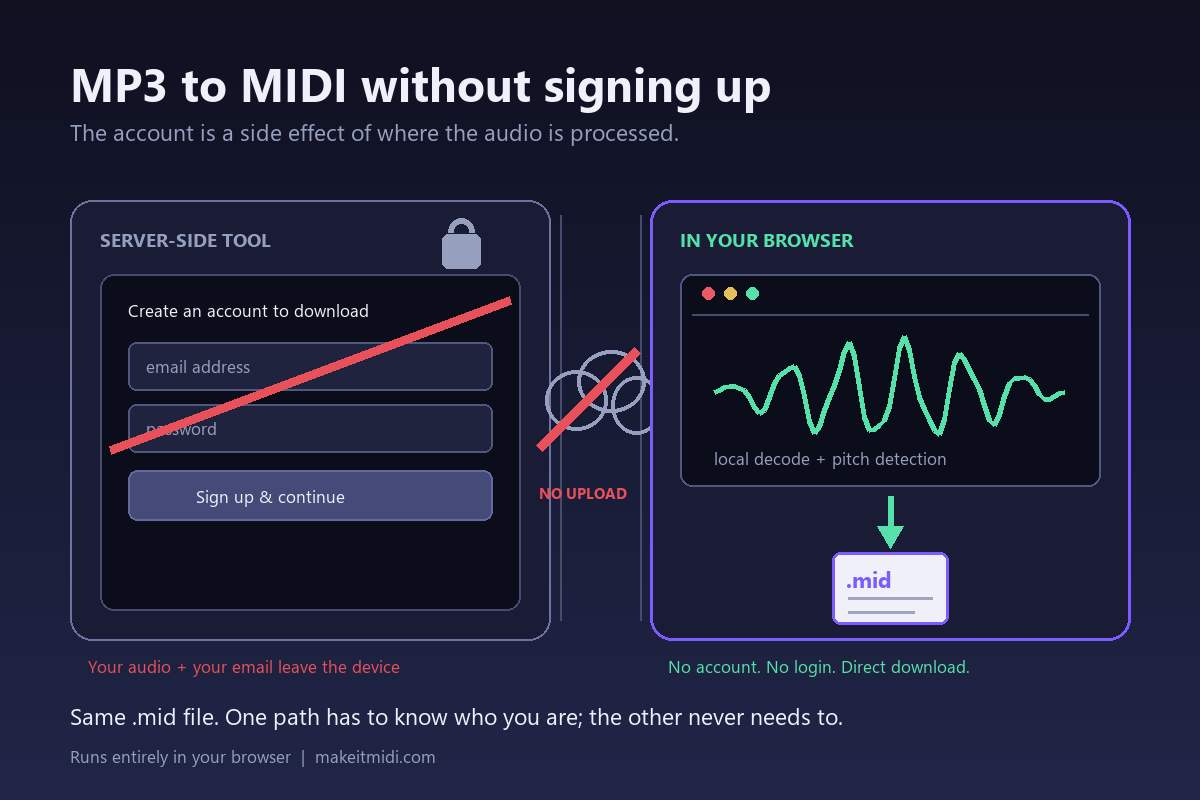
Why a signup wall shows up in front of a MIDI download at all
A signup form is rarely about the conversion. It is a consequence of where the conversion happens. If a service sends your audio to a server to be processed, that server has to know whose file this is, where to put the result, how long to keep it, and who is allowed to fetch it again. An account is the simplest way to answer all four questions, so a login ends up in front of the download button. Email verification, a trial counter, and a "your conversions" page tend to follow from the same design.
None of that is required to turn a waveform into note events. It is required to run a shared, remote, per-user service. That distinction matters when you are deciding what to hand over: on a server-based tool you are not just giving an email address, you are also sending the audio itself off your device. On a browser-based tool there is no per-user job to track, so the wall has no job to do. We are describing that general architecture, not asserting what any particular program does or does not offer built in — we have not checked an official feature list for every version of every editor, and guessing about someone else's product would be worse than describing the two routes honestly.
Why this converter has no account at all
All of the decoding and pitch detection runs inside your browser. The page makes no network request carrying your audio, and the file stays on your device. With nothing uploaded, there is no server-side job to attach to a user, no result to store under a name, and no reason to ask who you are — so there is no account, no login, and no gate in front of the download. You pick a file, wait for the notes to be detected, and save the .mid. That is the whole flow.
The file you get is a Standard MIDI File (SMF) format 0, single track, 480 ticks per quarter note, at 120 BPM. It transcribes a single melodic line, not a chord-by-chord or instrument-by-instrument separation. MP3, WAV, OGG, M4A/AAC and FLAC all take the same path, and the code sets no file-length or file-size limit — only your device's memory does. We publish no accuracy percentage, because the result depends entirely on the source recording; a single number would be a guess.
Once you have the .mid, the step that works in every DAW and notation editor is the same: convert the audio to a .mid file first, then import that file. We deliberately do not claim that any specific program has audio-to-MIDI conversion built in, or that it handles imported files in a particular way. We have not verified that against an official source for every version, and inventing a feature list for someone else's software would be less useful than giving you a route that holds everywhere. There is also no batch queue, no saved conversion history and no account dashboard here — those are account features, and this tool does not have them.
What signing up would not fix: out-of-tune notes
It is tempting to assume that a free, no-signup tool must be the sloppy one and that a paid account buys you accuracy. It does not work that way. The notes that come out wrong are wrong for a reason that has nothing to do with accounts, prices or upload limits: it is a limit of pitch detection itself. During a pitch bend, slide, ornament or vibrato, the real fundamental frequency moves continuously between semitones. The detector has to pick one note number per frame, so frames inside the bend get rounded to the nearest semitone and can be written down as the wrong notes — a flicker of short neighbouring notes where you expected one sustained pitch. Microtonal material is pulled onto the nearest semitone too, because it falls outside the twelve-tone grid entirely. The engine here writes those moving pitches out separately as standard MIDI pitch bend events (0xE0) alongside the note events, but the note layer still has to commit to a semitone; bending a wrong base note very smoothly is still a wrong note.
This is worst on guitar bends and wide vibrato, vocal slides and melisma, string vibrato, and blues or soul phrasing, where pitch motion is the whole point of the performance. It is nearly absent on clean, isolated piano single notes and a steady synth lead, where the pitch sits still. In the community threads where people complain about this, nobody is blaming a free tier — the same drift is reported on converters costing $80. So when you choose a tool, the useful question is how it lets you handle bends, not whether it charges or asks you to register.
Practical handling: look at the detector's spectrogram for where notes glide or carry grace notes and correct those positions by hand, choose a cleaner source, use a single-note-mode editor for the awkward phrases, and accept that a bend-heavy take is a draft rather than a finished transcription. A signup form cannot remove any of those steps. What it can change is how much of your audio and your identity leaves your machine before you find out the result needs editing.
What you give up when there is no account
Honesty cuts both ways. With no account there is no cloud history to come back to, no way to resume yesterday's job on another device, no saved project list, and no batch queue running in the background. Each conversion is self-contained: the audio is in your browser, the .mid lands in your downloads folder, and closing the tab leaves nothing behind on a server. If you need a library of past conversions synced across machines, a browser-only tool is the wrong shape for that job.
For a single file, though, that trade is usually the point. You are not creating an account, waiting for a verification email, or wondering who else can see the upload — you are finding out, in a few seconds, whether the melody in that recording is clean enough to be useful. If it is, keep the .mid. If the bends made it a mess, you now know exactly where to look, and you can decide whether to fix it by hand or try a cleaner take.