← Back to the MP3 to MIDI converter
What does a MIDI converter do?
A MIDI converter listens to an audio recording, works out what pitches are being played, and writes them out as MIDI note events — so you end up with a .mid file you can open in any DAW and edit note by note, instead of audio you can't pull apart.
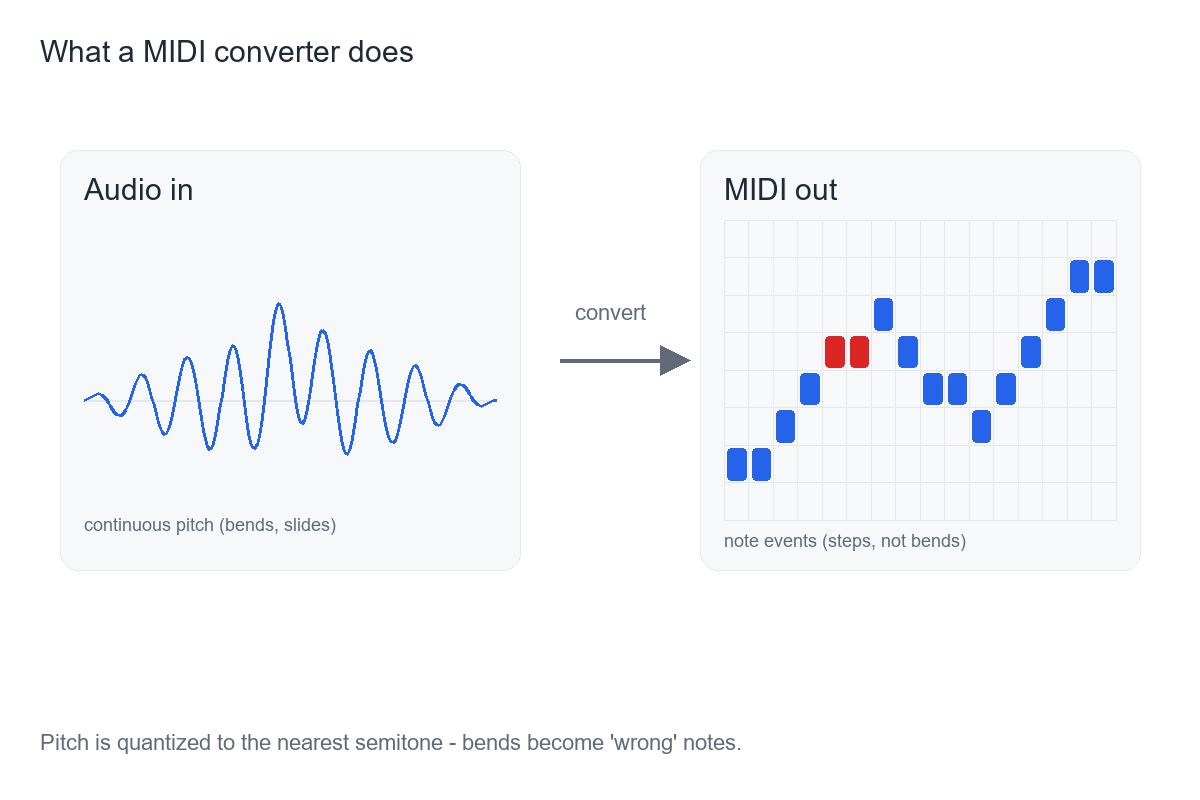
What it actually does, step by step
The job is turning sound into a list of notes. Concretely, a converter on this site runs entirely in your browser: the audio is decoded and analyzed on your device, nothing is uploaded, and there is no account to sign in to. You drop an MP3 (or WAV, OGG, M4A/AAC, or FLAC), and it does three things.
First it reads the samples. Then it performs pitch detection — for each short frame it estimates the fundamental frequency and decides which MIDI note number is closest, with timing. Finally it packages those note events into a Standard MIDI File: format 0, a single track, 480 ticks per quarter note, at 120 BPM. The file is small and opens anywhere.
One detail worth stating plainly: it extracts one melodic line from the audio. It is not separating the instruments in a mix. There is no file-length or size limit written into the page — only whatever your device's memory allows. That is the whole machine, and it is why the output is honest and fast rather than magic.
What you get — and what you don't
You get a monophonic sketch: note names with start times and lengths, in a file you can drag into a DAW and fix by ear. For a single line you already have as a clean recording, that is the shortest path to something usable.
You do not get a finished score. The converter isn't reading chords out of a dense mix, it isn't separating instruments, and it isn't producing lyrics or a perfect transcription. Treat the output as a skeleton — the rhythm, the contour, the rough pitch — that you finish yourself. No accuracy percentage is printed on purpose: the result depends entirely on the source you feed it, and any number we printed would be a guess rather than a fact about your file.
Why even a good converter only gives you a draft on some material
This is the part that surprises people, and it applies to every pitch-detection tool, AI-labeled or not. A detector has to round a continuously moving pitch into semitone note events. Any note that bends, slides, or wobbles (vibrato) has an instantaneous frequency that keeps changing, so the detector snaps it to the nearest semitone and it lands sharp or flat even when the pitch was detected correctly. Guitar bends and wide vibrato, vocal slides and runs, blues and soul bent notes, sustained string vibrato, and quarter-tone or microtonal music come out off almost by definition. A clean solo piano or a steady synth lead, by contrast, comes out fine.
The honest framing: it is not that a free tool is "worse" than a paid one. In producer forums the complaints about out-of-tune output attach to free browser tools and the $80 desktop options alike — even the well-rated paid tools leave the last bit of correction to you. Choose by running a bend-heavy clip of your own through a tool and watching what it does with the bends, not by whether it is free.
How to live with it: look at the detector's output around the slide and ornament spots and nudge those few notes by ear, pick the cleanest take you have, or run a single-note correction pass in an editor like Melodyne. On bend-heavy material, accept that the converter gives you a draft — and finish the last 20% yourself.
How to pick one, and use it well
Judge a converter by how it behaves on the material you actually have, not by a free-versus-paid label. If your source is a steady single line, almost any local converter will do the job. If it is full of bends and slides, none of them will hand you a clean score, so pick the one that makes the manual fix easy and that you trust with your file.
This site's converter runs locally, needs no account, and hands you a Standard MIDI File you own. Use it to get the skeleton fast, then refine — that is what the tool is for.