← Back to the MP3 to MIDI converter
MP3 to MIDI: AI vs No AI — what's the difference?
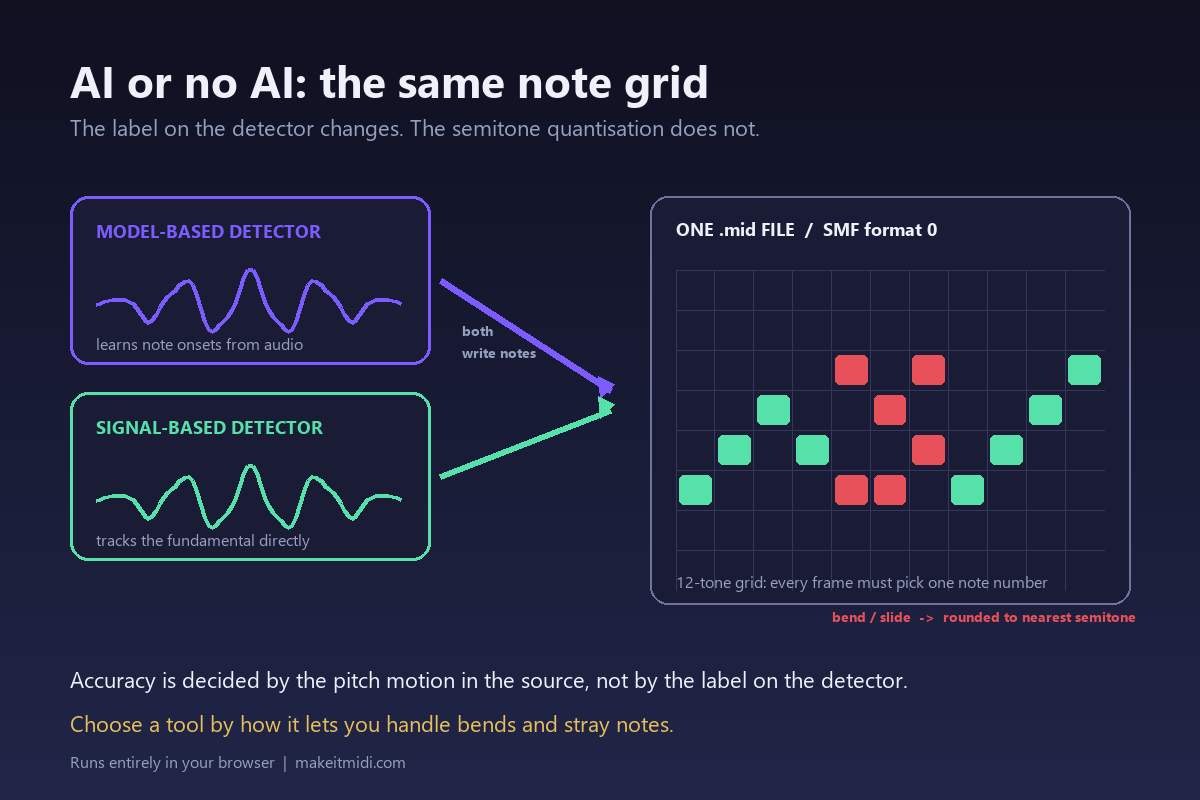
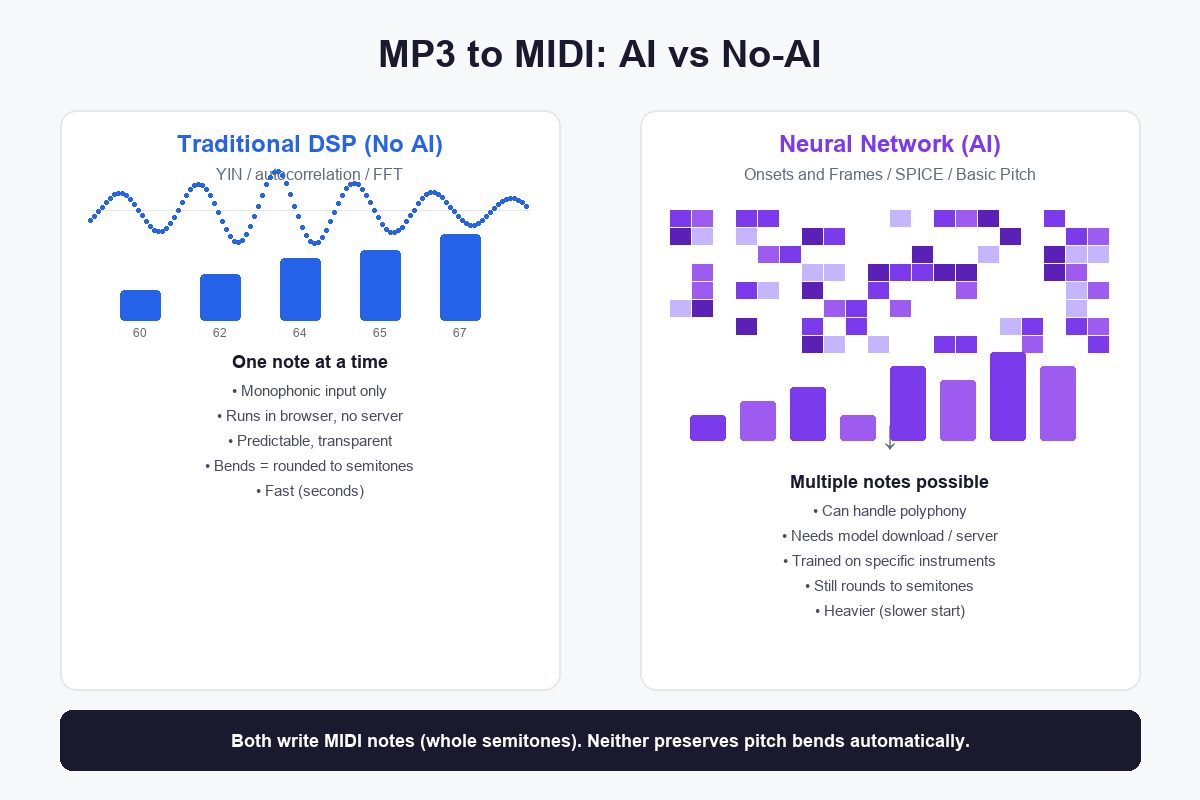
"AI" converters run a neural network that was trained on thousands of hours of specific instruments to detect note onsets and pitches. "No AI" converters run classic digital signal processing — pitch trackers like YIN or autocorrelation — that follow the fundamental frequency of whatever audio you give them. The AI can find multiple notes at once (polyphony); the no-AI approach handles one line at a time but runs lighter and more predictably. Both write MIDI notes, which are whole semitones — so neither one preserves pitch bends automatically.
What "no AI" means in a converter
The classic approach is fundamental-frequency estimation. The converter takes your audio, splits it into short frames (a few milliseconds each), and for each frame asks: what is the dominant pitch? The most common algorithm for this is YIN, which works by comparing a signal against a time-shifted copy of itself and finding the lag where they line up — that lag corresponds to the period, and its reciprocal is the frequency.
This is pure math, no training data. It does not know what a piano is, what a guitar is, or what a vocal is. It just finds the strongest periodic signal in each frame. The sequence of measured frequencies is then rounded to the nearest MIDI note number and written as note-on / note-off events.
The strength of this approach is its transparency: the behavior is deterministic, you can reason about why it produced what it produced, and it runs in milliseconds because there is no model to load. The limitation is that it tracks one pitch at a time. Feed it a full mix — drums, bass, vocals, guitars all playing together — and the dominant-frequency tracker locks onto whatever is loudest, producing a confused single line that does not match any one instrument.
This is why no-AI converters, including the one on this site, ask you for a clean single-line source: an isolated melody, a solo piano, a vocal recording, a guitar riff by itself. On that material, fundamental-frequency tracking works well. On dense polyphonic material, it does not.
What "AI" means in a converter
AI-based converters use a trained neural network. The most influential architecture in this space is called Onsets and Frames (published 2018), and tools built on it — such as Spotify's Basic Pitch and the open-source Neural Note — remain the most widely used free AI transcription tools.
Instead of tracking one pitch, the network is trained to answer two questions for each moment in the audio: "is a note starting?" (onset detection) and "which notes are currently sounding?" (frame-level pitch classification). The training data is typically MIDI-and-audio pairs — recordings of real piano performances paired with the exact MIDI that produced them — so the network learns what piano notes look like in a spectrogram.
Because it classifies all active notes per frame rather than tracking one frequency, the AI can transcribe chords and multi-note material that a fundamental-frequency tracker cannot. That is the real functional difference, not some magic accuracy number.
But the AI brings its own constraints:
- It needs a model file. The network weights are downloaded (or loaded from a server) before conversion can start. The Onsets and Frames model is tens of megabytes; lighter variants exist but none is as small as a YIN implementation, which is a few hundred lines of code.
- It was trained on specific instruments. A model trained on solo piano will recognize piano notes well and other instruments less reliably. There is no universal "all instruments" model — each one has a training distribution, and material far from that distribution will be transcribed poorly.
- The output is still MIDI notes. The network classifies which semitone is sounding. It does not output continuous pitch. A bent note, a vibrato, a slide between pitches — the AI hears the movement, but the output is still a sequence of whole-semitone note events, the same as the no-AI approach. The rounding happens at the output stage, after detection.
What stays the same
Regardless of which method produced the .mid file, the output format is Standard MIDI File: note-on events with a pitch number (0–127, each a semitone), a velocity, and a timestamp. There is no "AI MIDI" or "DSP MIDI" — the file format does not know or care how the notes were found.
That means the downstream work is identical. You open the .mid in a DAW, you look at the piano roll, and you fix wrong notes the same way. The pitch-bend rounding problem affects both equally: a vocal slide or guitar bend becomes a staircase of semitone-stepped notes no matter how smart the detector was, because the output is notes, not continuous pitch.
This is why claims that "AI conversion is more accurate" need qualification. If the material is polyphonic (a chord, a full mix), the AI can detect notes that the no-AI approach simply cannot — that is a genuine capability difference. If the material is a single melodic line, both approaches are detecting one pitch per frame, and the main source of error (bends being rounded) is shared. No accuracy percentage is published here because the result depends on the source material, not on which method is "better" in the abstract.
Which one should you use?
Use a no-AI (DSP) converter when:
- Your source is a single melodic line — a vocal, a solo instrument, a whistle, a hummed melody
- You want fast results with no model download or server upload
- You want predictable, transparent behavior you can reason about
- You are working in a browser and want everything to run locally
The converter on this site is the no-AI type. It runs a YIN-based pitch tracker entirely in your browser, processes your file locally, and outputs a format-0 .mid file. It is built for single-line sources and does not pretend to transcribe chords.
Convert a single-line audio file to MIDI
Use an AI converter when:
- Your source has multiple simultaneous notes — a piano chord, a full mix, a band recording
- You are transcribing piano specifically (most AI models are trained on piano and perform best there)
- You are willing to download a model or upload your file to a server
- You need a starting point for chordal material that a monophonic tracker cannot provide
If that is your case, search for "Basic Pitch" (Spotify's open-source tool, runs in browser with a model download) or "Neural Note" (a desktop wrapper around the same model). Both are free. Both still produce MIDI notes that you will likely need to correct in a DAW afterward.
Why some people search "mp3 to midi no ai"
The search query "mp3 to midi no ai" appears in Google's autocomplete suggestions, and it reflects a real preference. Some users do not want their audio processed by a neural network whose training data and internal behavior are opaque. They want a tool whose behavior they can understand: it finds the pitch, it rounds to a note, it writes the file. Classic DSP offers that.
Others search "mp3 to midi ai" because they have heard that neural networks can handle chords and full songs. That is true for the polyphony part. But the expectation sometimes extends to "the AI will get every note right" — and that is not what any converter currently delivers. The AI is better at finding notes in dense material, not at rounding bends more musically. The output is still semitone notes.
The honest summary
AI and no-AI converters solve different parts of the same problem. The no-AI approach is a fast, transparent, single-line tracker that runs anywhere. The AI approach is a heavier, trained model that can find multiple notes at once but comes with model downloads, training-distribution limits, and the same semitone rounding on output. Neither one magically removes the need to check and fix the result by ear.
Pick by what you are feeding in: one line or many notes at once. That is the real dividing line — not "AI good, no-AI bad" or the reverse.