← Back to the MP3 to MIDI converter
Can I convert MP3 to MIDI with Python?
Yes — a Python pipeline can do it, but the language is not what decides which notes you get. Decode, detect, quantize and write are the same four steps in Python, in JavaScript or in the browser page here, and the notes people call “out of tune” come from one of those steps, not from the language you wrote them in.
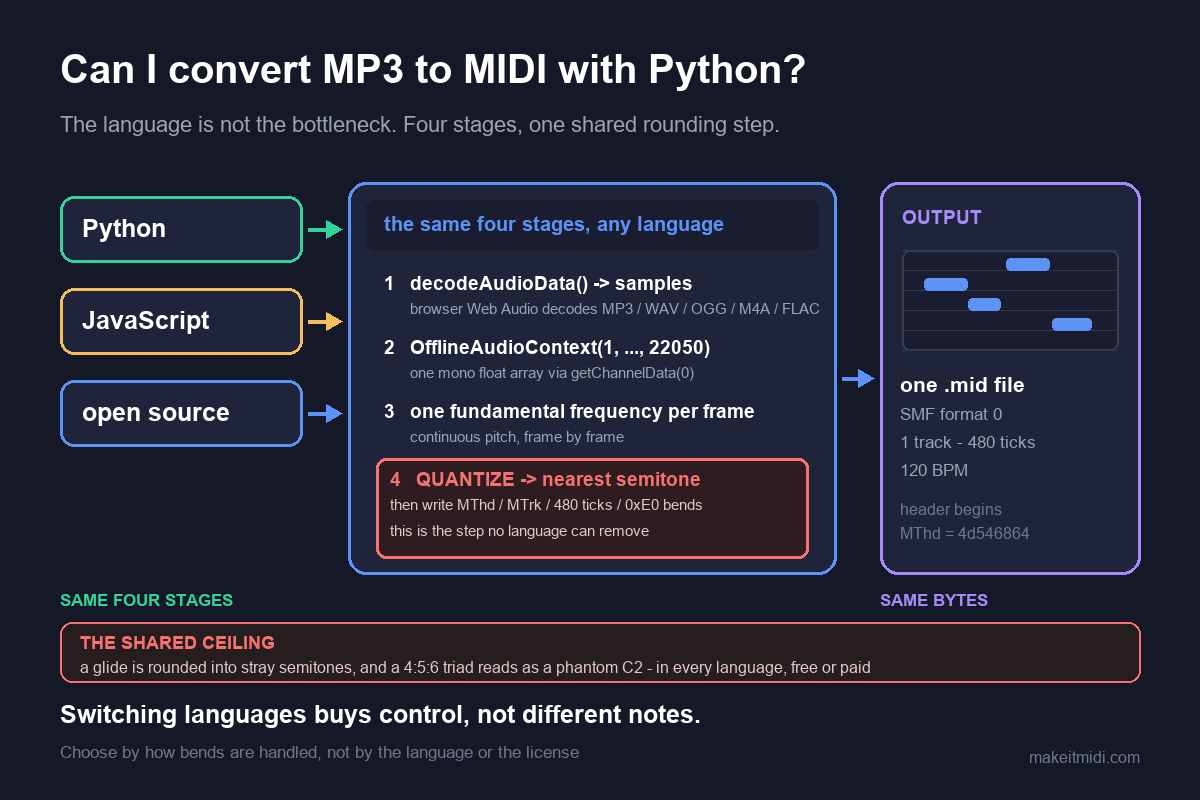
What a Python converter actually has to do
Strip away the language and every audio-to-MIDI converter is the same four-stage chain. First, compressed audio is decoded into raw samples. Second, those samples are reduced to one mono stream at a fixed sample rate. Third, each short analysis frame is reduced to a single estimate of fundamental frequency. Fourth, that continuous sequence of frequencies is quantized into discrete note numbers and serialized into Standard MIDI File bytes. A library, a model or a homegrown script changes how each stage is implemented; it does not remove any of the four.
You can read the whole chain in the converter on this site, which happens to be written in JavaScript and runs in your browser rather than in a Python process. In its own bundled code, the file bytes go to decodeAudioData(...) and are then rendered through new OfflineAudioContext(1, length, 22050) and read back with getChannelData(0), so the detector receives one plain mono array of samples at 22050 Hz. On the output side the same bundle builds MThd and MTrk chunks, uses 480 ticks per quarter note, calls addPitchBend, and hands you a Blob via URL.createObjectURL. Not one of those operations is language-specific. Write the same four stages in Python and you produce a file whose header still begins with the same four bytes, MThd, because SMF is a byte format, not a Python object.
That matters for the searches behind this question — mp3 to midi python, audio to midi github, audio to midi open source. The unspoken assumption is often that writing your own pipeline will get you more accurate notes than a web page. The honest answer is that it gets you control over the four stages, which is genuinely valuable, but it does not get you a different set of stages. The step that decides whether a bend becomes one note or five is step three and four, and they are the same arithmetic whatever you wrote them in.
Why switching languages will not fix out-of-tune notes
During a pitch bend, slide, vibrato or ornament, the true fundamental frequency moves continuously between semitones. A detector that commits one note per frame has to round each instantaneous value to the nearest of twelve equal-tempered pitches, so one sustained gliding note becomes a little cluster of neighbouring semitones. Microtonal material gets pulled onto the nearest step for the same reason. This is worst on guitar bends and wide vibrato, vocal slides and melisma, string vibrato, blues and soul phrasing, and microtonal music; it is nearly absent on clean, isolated piano single notes and a steady synth lead. No library, license or programming language removes that rounding — it is the definition of turning continuous frequency into MIDI notes.
Dense backing adds the classic phantom bass. A just-intoned major triad sits at the ratio 4 : 5 : 6: C4 (261.63 Hz), E4 (329.63 Hz) and G4 (392.00 Hz) are all close to integer multiples of 65.4 Hz (divide by 4, 5 and 6), so the combined waveform repeats roughly once every 1/65.4 s. A period-based detector locks onto that shared repetition and reports about 65.4 Hz — C2, two octaves below the lowest note actually played. That is the arithmetic of three real notes overlapping. Rewriting the detector in another language reproduces the arithmetic exactly.
There is a byte-level detail here that most explanations skip, and it is worth knowing before you port anything. In this converter's bundle, bends are not simply thrown away: the writer emits pitch bend events (status byte 0xE0, with a 14-bit value written as two bytes around a centre of 8192) alongside the ordinary note-on and note-off events. So the output actually carries two layers — discrete note numbers and a continuous bend curve. Piano-roll views and many import paths show mostly the discrete layer, which is why a glide looks like a run of wrong notes even though the bend information is in the file. A Python pipeline that writes only note events will flatten that same glide in exactly the same visible way. The limitation sits in quantizing and displaying pitch, not in the syntax used to emit the bytes.
None of this tracks with price either. We publish no accuracy percentage, because the result depends entirely on the recording and any single number would be a guess. In community threads the recurring complaint is that bends and slides make the output sound out of tune, not that the tool was free and not that it was written in the wrong language; people describe the same drift on paid converters costing around $80. Choosing a tool by how it handles bends beats choosing it by its language, its license or whether it charges.
What Python genuinely buys you
Here is the part a fair answer has to concede: a script you control is better at several real jobs. Batch-processing a folder overnight, automating a repeatable experiment, embedding conversion inside a larger service, swapping detectors to compare their output, pinning dependencies for an auditable fully offline run, or remapping ticks and tempo before you write the file — all of those are straightforward in code and awkward or impossible on a single web page. A browser page is a one-file-at-a-time interaction: no account, no queue, no history, no API, no batch mode. Needing those things is a good reason to write Python, and pretending otherwise would be dishonest.
But notice what those advantages are. They are all about control of the workflow, not about changing the measurement. If your problem is that a vocal take full of slides comes out as a scrambled run of semitones, a script gives you more places to intervene and more ways to inspect the intermediate data — it does not give you a different quantization step. If your problem is that you have five hundred files to process unattended every night, a browser page is simply the wrong shape of tool. Those are two different problems, and “should I use Python?” is really asking which one you have.
We deliberately do not name a library, a GitHub repository or a package to install, and we do not describe anyone's API, command-line flags or version requirements. We have not verified every project's current state against its own official documentation, and guessing at someone else's feature list would be worse than giving you a route that holds everywhere. That is also why we make no claim about what any particular editor, DAW or notation program has built in. The step that always works is the one below: get a .mid file first, then import it into whatever you use.
A workflow that works either way
- Convert the audio to a
.midfirst. On this page, drop the file, press Convert to MIDI, then Download .mid. Decoding and pitch detection both happen locally in your browser, the audio never leaves your device, there is no upload, no account and no login. MP3, WAV, OGG, M4A/AAC and FLAC are all decoded by the browser itself. The code contains no check on file length or file size, so the practical ceiling is your device's memory. The output is a Standard MIDI File (SMF) format 0, one track, 480 ticks per quarter note — the same bytes a Python writer would produce. - Set the tempo before you align anything. The file is written at a fixed 120 BPM and carries no tempo map from the original song. Set your project or your parser to the real speed first, whether that project is a DAW or a script.
- Expect to edit the notes, and keep the honest boundary in view. The converter extracts a single monophonic melodic line, not a chord-by-chord or instrument-by-instrument separation. Read the spectrogram for where notes glide or carry grace notes and correct those positions by hand, use a single-note or monophonic mode if your editor has one, and pick the cleanest source you can — a solo take over a full mix. Cleaning the source beats cleaning the output.
- Treat bend-heavy material as a draft. Guitar bends, vocal melisma and wide vibrato will need manual work in any pipeline, free or paid, scripted or browser-based. That is the nature of the measurement, not a defect you can code around.
Short questions, short answers
Do I need to install Python to use this converter? No. The runtime here is the browser itself: Web Audio decodes the file and JavaScript runs the detector, so there is no interpreter, virtual environment, model download or dependency tree to set up. You open the page and download a .mid.
Is there an open-source MP3 to MIDI project I should use? We do not recommend or rank specific projects, because we have not verified their current state against their own official sources. If you want an auditable, automatable pipeline, that is a legitimate reason to look; if you just need the notes from one file, converting first and importing the result works with any editor or library you already have.
Will a different library fix the wrong notes? It can change how the detector behaves, but it cannot remove the step where a continuously moving pitch is rounded to the nearest semitone. If the source is full of bends and slides, plan on manual correction regardless of which language or library produced the file.