← Back to the MP3 to MIDI converter
Do I need a plugin to convert MP3 to MIDI on Mac or Linux?
No — you need no plugin and no Mac- or Linux-specific build: the entire conversion runs inside your browser tab, so the same page works on macOS, Linux, Windows or ChromeOS, and you download a .mid file directly.
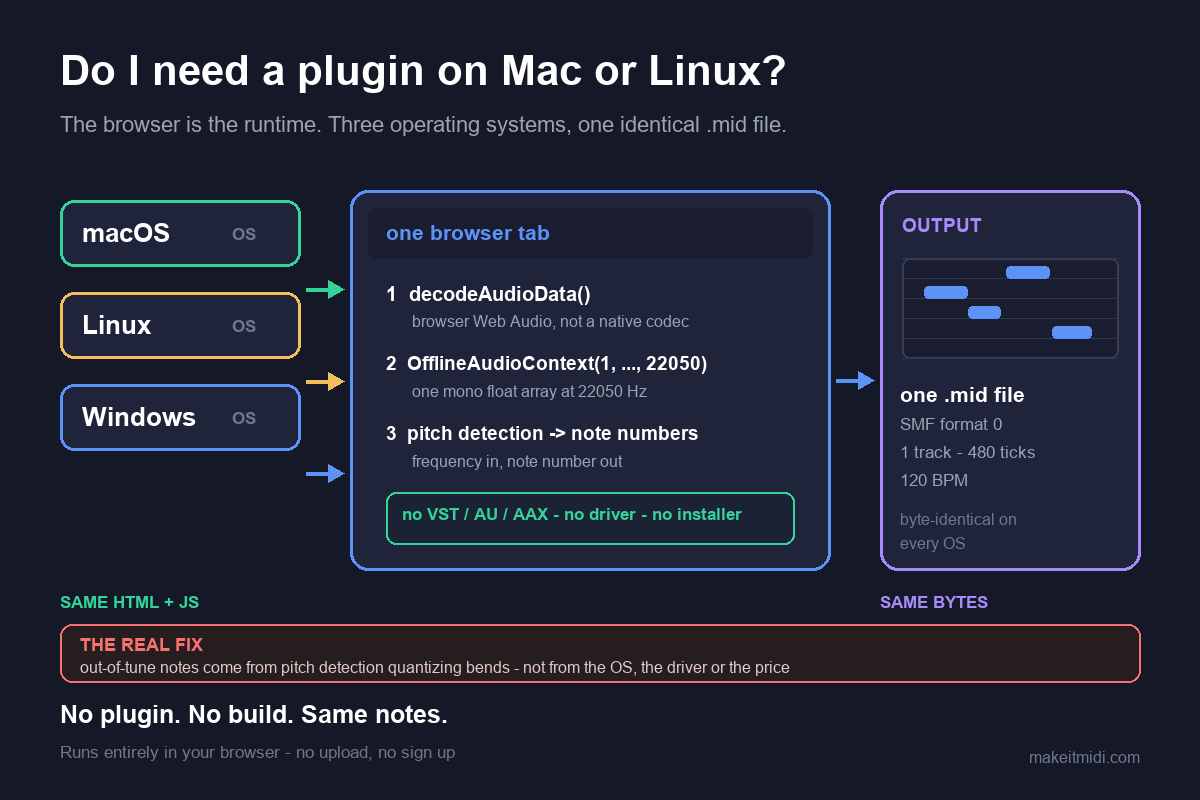
Why there is no Mac or Linux version to install
The runtime here is the browser, not the operating system. In the converter's own code, the uploaded bytes are handed to new (window.AudioContext || window.webkitAudioContext)().decodeAudioData(...) — decoding is done by the browser's Web Audio implementation, not by a native codec we ship. The result is then rendered through new OfflineAudioContext(1, length, 22050) and read back with getChannelData(0), so the pitch detector receives one plain mono array of samples at 22050 Hz. Nothing in that chain is OS-specific: no VST, AU or AAX binary, no CoreAudio or ALSA configuration, no Apple Silicon versus Intel build, no installer and no driver to configure.
That is why there is no "Mac version" or "Linux build" to download. The same HTML and JavaScript run wherever a current browser implements Web Audio — macOS, Linux, Windows, ChromeOS and phones. MP3, WAV, OGG, M4A/AAC and FLAC are all decoded by the browser itself; the converter only ever sees mono samples. Decode and pitch detection both happen locally on your device, the audio never leaves it, there is no upload, no account and no login, and you download the .mid directly. The code contains no check on file length or file size, so the practical ceiling is your device's memory rather than a built-in limit. The output is a Standard MIDI File (SMF) format 0, one track, 480 ticks per quarter note, written at 120 BPM — a byte-level format that is identical on every operating system.
What a plugin is, and what you give up without one
A plugin (VST, VST3, AU, AAX and similar) is a native binary that a host DAW loads into its own process. It has to be compiled for each OS and CPU architecture, installed into a scan folder, re-scanned after updates, and it only exists inside that host's session. In exchange it can offer real-time input, host tempo sync, automation and editing on the same timeline. A browser page gives you none of that: it produces a file you then import. That is a real trade-off, not a hidden one — if you need conversion to happen live inside a DAW session, a plugin is the right shape of tool.
We do not claim any DAW, notation program or plugin bundle does or does not include a built-in audio-to-MIDI feature. We have not verified that against an official source for every version, and guessing about someone else's feature list would be worse than giving you a route that works everywhere: convert the audio to a .mid first, then import that file into whatever editor or host you use. That two-step workflow holds on macOS, Linux and Windows alike. One more honest boundary: the converter extracts a single monophonic melodic line, not a chord-by-chord or instrument-by-instrument separation, so a dense mix is already a compromise before any plugin enters the picture.
Why changing your operating system will not fix out-of-tune notes
A lot of "best audio to MIDI plugin" and "mp3 to midi mac" searches start with the same frustration: the notes came out wrong, so maybe a different platform or a better plugin will fix them. It will not. During a pitch bend, slide, vibrato or ornament, the true fundamental frequency moves continuously between semitones. Each short analysis frame has to be quantized to the nearest note, so one sustained pitch becomes a little cluster of neighbouring semitones. Microtonal material gets pulled onto the nearest step of twelve-tone equal temperament for the same reason. This is worst on guitar bends and wide vibrato, vocal slides and melisma, string vibrato, blues and soul phrasing, and microtonal music; it is nearly absent on clean, isolated piano single notes and a steady synth lead.
Dense backing adds the classic phantom bass. A just-intoned major triad sits at the ratio 4 : 5 : 6: C4 (261.63 Hz), E4 (329.63 Hz) and G4 (392.00 Hz) are all close to integer multiples of 65.4 Hz (divide by 4, 5 and 6), so the combined waveform repeats roughly once every 1/65.4 s. A period-based detector locks onto that shared repetition and reports about 65.4 Hz — C2, two octaves below the lowest note actually played. That is the arithmetic of three real notes overlapping, not a driver problem, not a bitrate problem and not a platform problem.
None of it depends on the operating system, the audio driver, the architecture or whether you paid for the tool. We publish no accuracy percentage, because the result depends entirely on the recording — any single number would be a guess. In community threads the recurring complaint is that bends and slides make the output sound out of tune, not that the tool was free and not that it ran on the wrong platform; people describe the same drift on paid converters costing around $80. Choosing a tool by how it handles bends beats choosing it by which OS it ships on or whether it charges. Because the browser downmixes to a fixed mono 22050 Hz stream before detection, even your sound card's sample rate is out of the equation.
A workflow that works on any computer
- Convert in the browser. Drop the file on the converter, press Convert to MIDI, then Download .mid. No installer, no account, no upload — identical steps on macOS, Linux and Windows.
- Import the
.midinto your DAW or editor. We do not claim any of them has or lacks a built-in converter; getting the notes in first is the step that always holds. SMF format 0, one track, 480 ticks per quarter note. - Set the tempo before aligning anything. The file is written at a fixed 120 BPM and carries no tempo map from the original song, so set your project to the real speed first.
- Treat a bend-heavy take as a draft. Read the spectrogram for where notes glide or carry grace notes and correct those positions by hand, use a single-note or monophonic mode if your editor has one, and pick the cleanest source you can — a solo take over a full mix. Cleaning the source beats cleaning the output.
Short questions, short answers
Does it work on Apple Silicon Macs? Yes. There is no native binary to translate or rebuild; the browser supplies the runtime, so the CPU architecture is the browser's concern, not the converter's.
Is there a Linux version to install? No installer exists and none is needed. The same page runs in any current Linux browser with Web Audio, and the .mid it writes is byte-identical to one written on a Mac or a PC.
Do I need a VST or AU plugin instead? Only if you need real-time conversion inside a DAW session. For a one-off file, convert in the browser and import the resulting .mid; that route works in any host on any OS.