← Back to the MP3 to MIDI converter
Can audio to MIDI keep pitch bends and slides?
Yes — a converter can keep them. This one writes the moving pitch of each note into the file as standard MIDI pitch bend events (status byte 0xE0) alongside the note events, so a guitar bend or a vocal slide survives as a continuous curve instead of being flattened into a row of semitones.
Note events and bend events are two different things
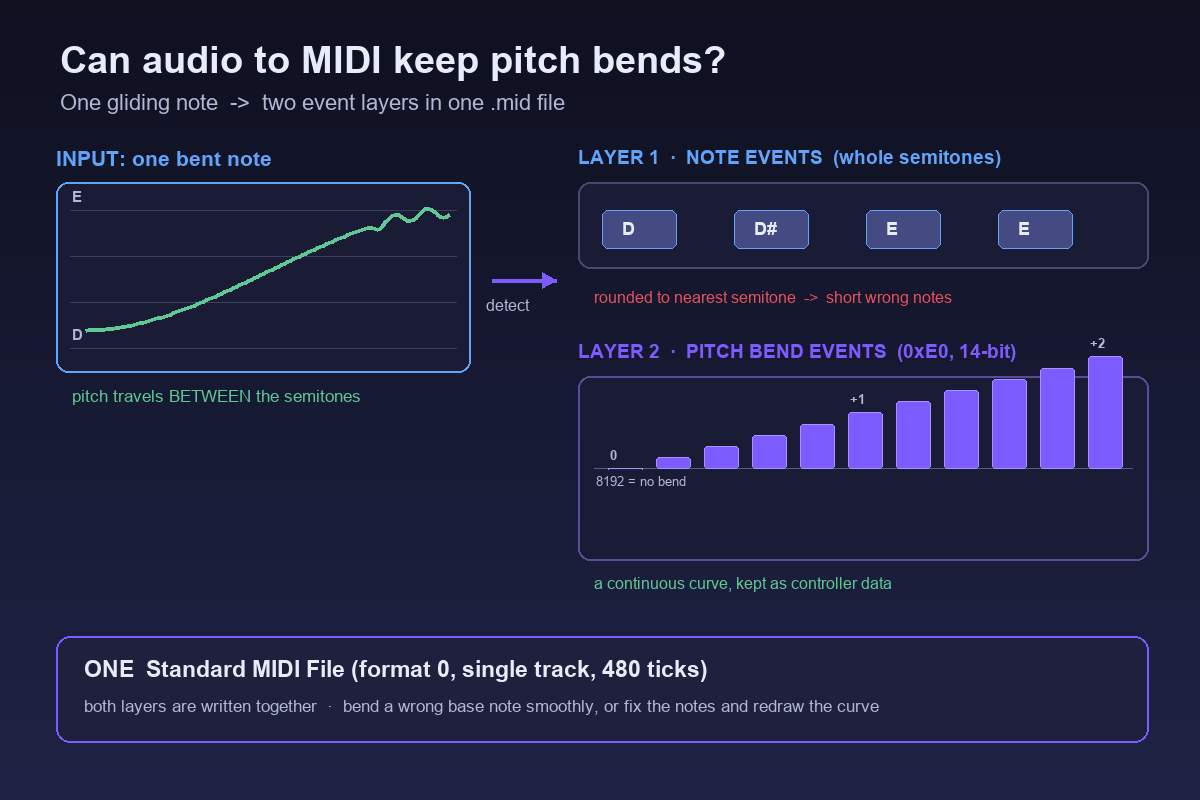
A MIDI file is not a recording of sound. It is a list of instructions, and there are two separate instructions that deal with pitch. A note event says "start playing note 64 at this time, stop at that time" — one whole semitone, fixed for the life of the note. A pitch bend event says "while notes are sounding, slide the tuning up or down by this much, right now". Its status byte is 0xE0 (224 with the channel number added), and it carries a 14-bit value centred on 8192: 8192 is no bend, higher values bend up, lower values bend down. A synth decides how many semitones the full range covers.
That distinction is exactly what a bend needs. A guitar player pushing a string from D up to E does not play a new key — the pitch travels between the two. If a converter only knows how to write note events, it has no way to describe that journey except by chopping it into several short notes at D, D sharp, E and back. With bend events, one note can hold while a curve of 0xE0 messages describes where the pitch actually went. So when people ask whether audio to MIDI can keep pitch bends, the honest technical answer is: the format has always been able to; the question is whether the converter bothers to write them.
What this converter actually writes into the .mid
The pitch detector here does not throw the bend away. For every note it finds, it keeps a short series of pitch offsets — a contour sampled across the length of that note. When the file is built, each note becomes a note event, and then each point on its contour is written out in order as a pitch bend event, spaced evenly across the note's duration. The result is one track holding both layers: the discrete notes, and a stream of 0xE0 messages that bend them. You can see it on the results page: notes that carry bends are labelled with their pitch-bend point count.
The file itself is a Standard MIDI File (SMF) format 0, single track, 480 ticks per quarter note, at 120 BPM. It is a transcription of a single melodic line, not a chord-by-chord or instrument-by-instrument separation. All of the decoding and pitch detection runs inside your browser: the audio never leaves your device, there is no upload, no account and no login, and you download the .mid directly. MP3, WAV, OGG, M4A/AAC and FLAC all take the same path, and the code sets no file-length or file-size limit — only your device memory does. We publish no accuracy percentage, because the result depends entirely on the source; any single number would be a guess.
So why can a bend-heavy conversion still sound out of tune
Keeping the bend events does not automatically make the result sound right, and this is the part most pages skip. Note events still have to pick a whole semitone. During a pitch bend, slide, ornament or vibrato, the true fundamental travels continuously between semitones, so the detector has to decide, frame by frame, which note number is "the" note. Frames inside the bend get rounded to the nearest semitone and can be written down as the wrong notes — a short run of alternating neighbours where you expected one sustained pitch. Microtonal material is pulled onto the nearest semitone for the same reason: it falls outside the twelve-tone grid entirely. The bend layer then bends whichever note the note layer committed to. If that base note is wrong, the curve bends a wrong note very smoothly.
This is worst on guitar bends and wide vibrato, vocal slides and melisma, string vibrato, and blues or soul phrasing, where pitch motion is the whole point of the performance. It is nearly absent on clean, isolated piano single notes and a steady synth lead, where the pitch sits still. In community threads about this exact problem, the complaint is that the pitch bends make the output sound out of tune — not that a free tool was used. People report the same drift on converters costing $80. This is a limit of pitch detection itself, not a "free tools are worse" problem. If you are choosing a tool, the useful question is how it lets you handle bends, not whether it charges.
Practical handling: look at the detector's spectrogram for where notes glide or carry grace notes and correct those positions by hand, choose a cleaner source, use a single-note-mode editor for the awkward phrases, and accept that a bend-heavy take is a draft rather than a finished transcription. A clean single-line source gives the bend layer a correct base note to work from; a dense bend-heavy mix gives it several competing ones.
How to work with the bend events afterwards
Once you have the .mid, open it in a piano-roll or notation editor and look for two layers: the note blocks, and a separate pitch-bend lane or controller lane underneath them. Fixing a bad bend usually means deleting stray short notes first (the semitone chop described above), leaving one longer note, then redrawing its bend curve by hand so the slide is continuous again. Many players also let you set the bend range in semitones; if a two-semitone push plays back as a whole octave, that is a bend-range setting in the instrument, not a broken file.
For any DAW or notation editor, the step that always works is the same: convert the audio to a .mid file first, then import that file. We deliberately do not claim that any particular program does or does not offer audio-to-MIDI conversion built in, or that it will display bend data in a specific way. We have not verified that against an official source for every version, and guessing about someone else's feature list would be worse than giving you a route that works everywhere. Once the .mid is in your editor, the note lane and the bend lane are where you rebuild the phrase.