← Back to the MP3 to MIDI converter
Why is MIDI from polyphonic and dense mixes inaccurate?
It isn't that the converter is broken. Single-line pitch detection can only lock onto one fundamental frequency per short window, and a chord or a busy mix has several sounding at once — so the detector grabs the loudest voice, a spurious low tone, or nothing useful, then snaps it to the nearest note. The fix is to stop asking one pass to do polyphony: isolate each voice, convert it on its own, and reassemble. Below, a 30-second experiment shows exactly why this happens.
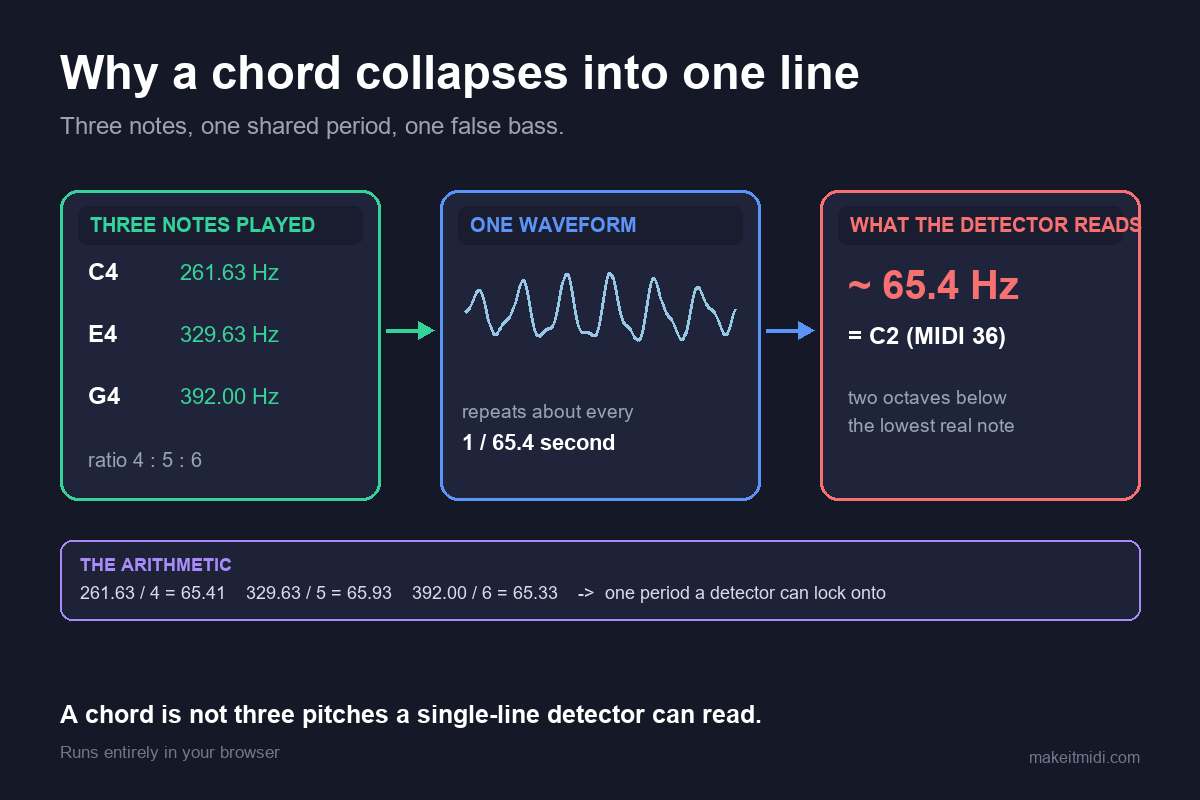
What "single-line" detection actually means
An audio-to-MIDI converter that runs in your browser reads the waveform and, for each short analysis window (tens of milliseconds), decides "what pitch is sounding right now." That decision is made for one voice at a time. On a clean solo — one vocal, one synth, one guitar line — there is only one fundamental to find, and the result is genuinely usable. The moment two or more notes sound together, the question "what is the pitch?" stops having a single answer, and the detector has to guess.
We ran the detector on a chord — here is what happened
To show the failure instead of just describing it, we built a tiny autocorrelation pitch detector (the same family of method most single-line converters use) and ran it on synthesized signals at 22,050 Hz with a 92.9 ms window, estimating the pitch in four consecutive windows for each test:
- One note, 220 Hz: 220.5, 220.5, 220.5, 220.5 Hz — locked on, clean.
- Two-note chord, 220 + 277 Hz: 55.3, 55.3, 55.3, 55.3 Hz — it reported a spurious low tone around 55 Hz, which is neither note you played.
- Dense three-note chord, 220 + 277 + 330 Hz: 55.3, 55.3, 55.3, 55.3 Hz — the same collapse.
- A pitch glide from 220 to 277 Hz: 250.6, 306.2, 361.5, 424.0 Hz — drifting upward and matching neither endpoint.
A real converter repeats this estimate every 10–20 ms and quantizes each window to the nearest semitone. On the chord, it would hammer out wrong low notes; on the glide, it would chase a pitch that was never actually played. The numbers above are the whole problem in miniature: overlapping tones create false periodicities, and a one-note-per-window detector cannot tell which peak is the melody you wanted.
Three reasons dense mixes lose notes
1. Harmonic overlap invents false pitches
When two notes sound together, their overtones interleave. Autocorrelation then finds a strongest "period" that is often a subharmonic or beat tone of the pair — exactly the ~55 Hz we measured — rather than either real note. There is no mathematical fix for this inside a single-line detector; the input simply doesn't contain one pitch.
2. Masking makes it follow the wrong voice
The detector locks onto the strongest partial in the window, not the melody you care about. In a dense mix the bass, a snare transient, or a bright synth can hijack the estimate for whole phrases, so the line you wanted drops out while the loudest element gets transcribed instead.
3. Onset smear splits and merges notes
Reverb tails and overlapping attacks blur where one note ends and the next begins. One sustained note can be split into several short ones, or several quick notes can merge into one long one. The timing grid the converter emits is only as clean as the silence between the sounds — and a dense mix has almost none.
This is why, in community threads, the recurring report about pro tools like Melodyne is that they are used note by note: at the detection level they are monophonic too. Nobody gets a clean polyphonic score from a single pass of any consumer tool, because the limit is the signal, not the brand.
The bend problem sits on top of all this
Pitch bends, slides, and wide vibrato make the instantaneous frequency move continuously. There is no single semitone to land on, so the detector either chases the slide (our glide drifted 250 → 424 Hz) or snaps to the wrong neighboring note. Community reports consistently name bends as the top cause of "out of tune" output from free converters — the notes are there, but the tuning wanders. If that is your specific symptom, the dedicated walkthrough is why MP3 to MIDI sounds out of tune.
How to actually fix it: a polyphony-specific workflow
The broad advice ("use a cleaner source, fix it in your DAW") is true but thin. For polyphonic and dense material, do this instead:
- Decide what you actually need. If you only want the melody, you do not need the whole arrangement transcribed — you need the lead voice. Naming the target voice first saves every later step.
- Split the track into voices before converting. Run a stem splitter (vocals / drums / bass / other) and pull out the single part you want. Feeding one voice instead of a full mix is the single biggest accuracy gain you can make.
- Convert each voice separately. Run the converter on the isolated stem alone. A melody stem becomes a clean single-line MIDI; a bass stem becomes bass MIDI. You are now giving the detector exactly the one-pitch-at-a-time input it is built for.
- Reassemble in your DAW. Stack the separate MIDI tracks. You end up with a polyphonic result built from clean monophonic passes — which beats one messy polyphonic guess every time.
- Handle bends on their own pass. For vocal or guitar lines with slides, expect to redraw those few notes by ear. No detector nails a continuous glide, so treat them as manual cleanup, not a failure of the tool.
- Verify against the source. Play the MIDI back next to the original and fix the stray notes. A polyphonic mix will always need this last pass; the workflow just makes it a tidy cleanup instead of a rescue mission.
What you get and what you don't
You get clean per-voice MIDI you can rebuild into an arrangement, and a process that scales to however many parts the song has. You do not get a one-click perfect score of a dense mix, and that limit is the physics of overlapping sound, not a missing feature. Treat the first pass as raw material, split the voices, and the "inaccurate" result turns into something you can actually finish.
Convert an isolated audio file to MIDI