← Back to the MP3 to MIDI converter
How well does MP3 to MIDI work on guitar tracks?
It handles clean single-note guitar lines well and gives you a one-line MIDI you can bring straight into a DAW, but bends, vibrato, double-stops and distortion push against a monophonic detector — and those same bends are the main reason guitar MIDI often sounds out of tune, which is a pitch-detection limit, not a “free version isn’t good enough” limit. The honest version is below.
What you actually get from a guitar MP3
You get a single melodic line, not a full tab or a separated multi-track export. The conversion runs entirely in your browser — the audio is decoded locally with the Web Audio API, nothing is uploaded, and you do not sign in; the conversion finishes and you download the .mid directly. The output is a Standard MIDI File (SMF) format 0: one track, 480 ticks per quarter note, 120 BPM, holding the detected melody. It accepts whatever your browser can decode — MP3, WAV, OGG, M4A/AAC, FLAC — and there is no length or file-size cap written into the page; the only limit is your device's memory.
That last point is the whole story for guitar: the page runs a monophonic pitch detector, so it tracks one pitch at a time. A clean, picked single-note phrase — one note ringing at a time — is close to an ideal input, and the MIDI you get back is genuinely usable. The trouble starts the moment the guitar does what guitars do best.
Where guitar specifically trips the converter
Guitar is expressive in exactly the ways a single-pitch tracker struggles with. The usual culprits:
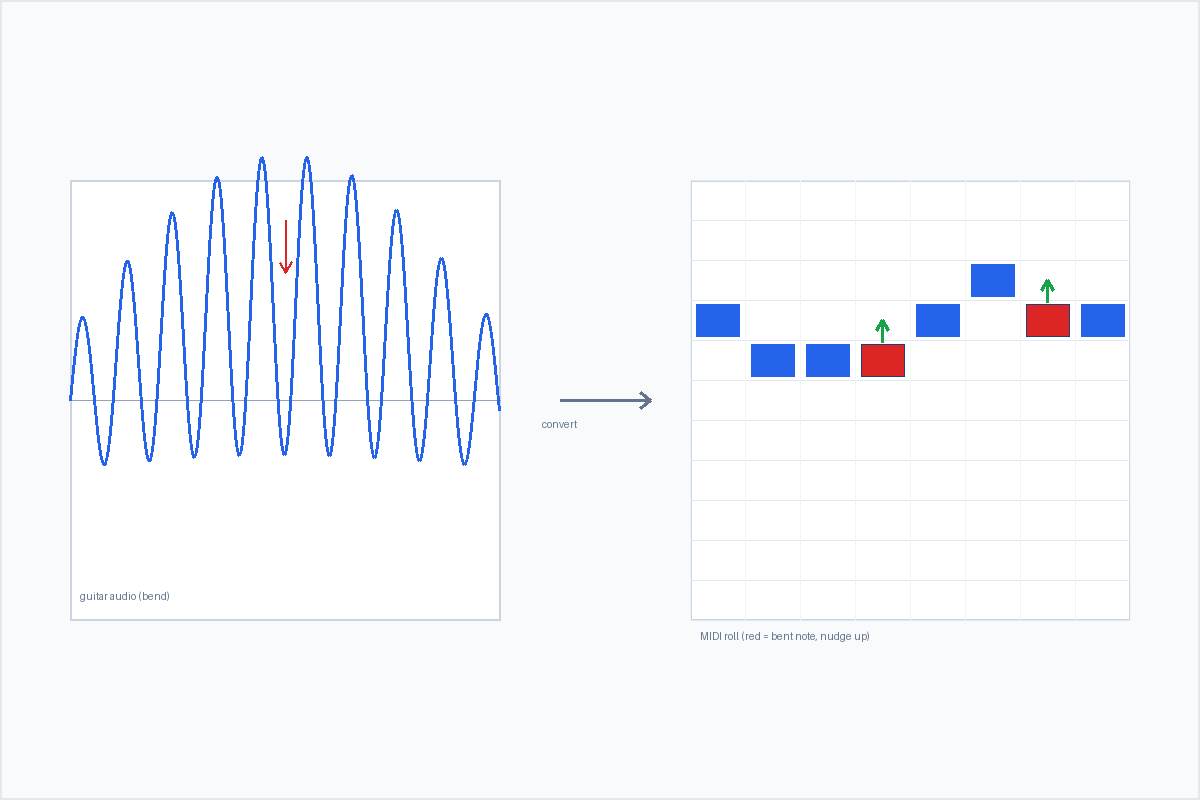
- Bends. During a bend the pitch is continuously changing, so there is no single semitone to land on. The detector snaps the glide to a neighbouring note and that note reads as “wrong.”
- Vibrato. A fast small oscillation around the pitch looks like the pitch is wobbling, so individual notes can come out slightly off or over-split.
- Slides and glissandos. Same cause as bends: the instantaneous frequency is moving the whole time, so the glide gets crushed onto whatever semitones it passes through.
- Double-stops, power chords, unison bends. Two notes at once are polyphony. The detector can only follow one line, so it keeps the most prominent note and drops the other.
- Distortion and long sustain. High gain adds harmonics and lets notes ring and overlap, which smears onset detection — it gets harder to tell where one note ends and the next begins.
None of this means the guitar result is useless. It means a monophonic detector is being handed a signal full of pitch motion and stacked notes, and there is no clean single-line answer in the physics of the sound. The dense-mix version of this wall is covered on the polyphonic and dense mixes page. For bending, expressive guitar the practical move is in the next section.
The “out of tune” question for guitar
Of all instruments, guitar is the one people most often complain about “out of tune” MIDI — and it is worth being precise about why, because the reason is not the price of the tool.
Why it happens. A pitch bend, a slide, or an ornament (a grace note, a hammer-on pull-off with pitch movement) makes the instantaneous fundamental frequency change continuously instead of sitting on a fixed note. The detector, which has to commit each moment to one semitone, quantises the bend or slide to a “wrong” neighbouring note. Microtonal inflections that sit between the twelve notes of equal temperament get hard-pulled to the nearest semitone. That is the detector faithfully reporting a sound that has no single pitch to report.
What makes it worse. Guitar bends and vibrato, blues and soul bends, slide guitar, and any microtonal playing will almost always trip this up. By contrast, a clean picked single note or a stable synth lead has no bend, so it comes out in tune. The variable is the performance, not the software tier.
How to handle it. A few practical moves: spot the bend and vibrato positions in the detector’s pitch trace and nudge those notes by ear; choose cleaner, less-bent source takes; use a dedicated monophonic correction tool (Melodyne in single-note mode is the common one) on the exported line; or simply accept that a bend-heavy riff converts into a draft you finish by hand. This is an essential pitch-detection limit — community reports about pro tools consistently note that even paid converters (the kind people pay around $80 for) mistrack bends too. Nobody blames the price, because the limit lives in the signal, not in the paywall. When you compare tools, judge how each one handles bends, not whether it is free.
If wandering tuning on bent passages is your specific symptom, the full walkthrough is on the why MP3 to MIDI sounds out of tune page.
After the conversion: bring the riff into your DAW
Getting the MIDI is only half the job — the point of converting a guitar riff is to keep working with it. Because the export is one Standard MIDI melody track, your DAW treats it like any other MIDI clip:
- Import the
.mid. Drop it into Ableton, FL Studio, GarageBand, Logic, Reaper, or anything that opens Standard MIDI Files. The import steps are on the FL Studio / GarageBand and Ableton pages. - Re-instrument it. The track carries notes, not guitar tone. Load a synth, a bass, or a drum-ish sampler on it and the same riff becomes a completely different part.
- Fix the bent notes first. Play the riff against the original and correct the red, off-by-a-bit notes from the bend sections before you build on it.
- Rearrange. Transpose it, change the tempo, quantise if you want it tighter, and write your own chords underneath. A riff extracted as MIDI is a skeleton you compose around — not a finished arrangement, and not a multi-track separation. You get the riff’s melody; you build the rest.
Convert a guitar recording to MIDI