← Back to the MP3 to MIDI converter
Can I turn an MP3 into sheet music?
Not in one step — a browser converter writes a .mid file of detected notes, and turning those notes into a printed score is a separate job you do after importing the file into a notation or piano-roll editor.
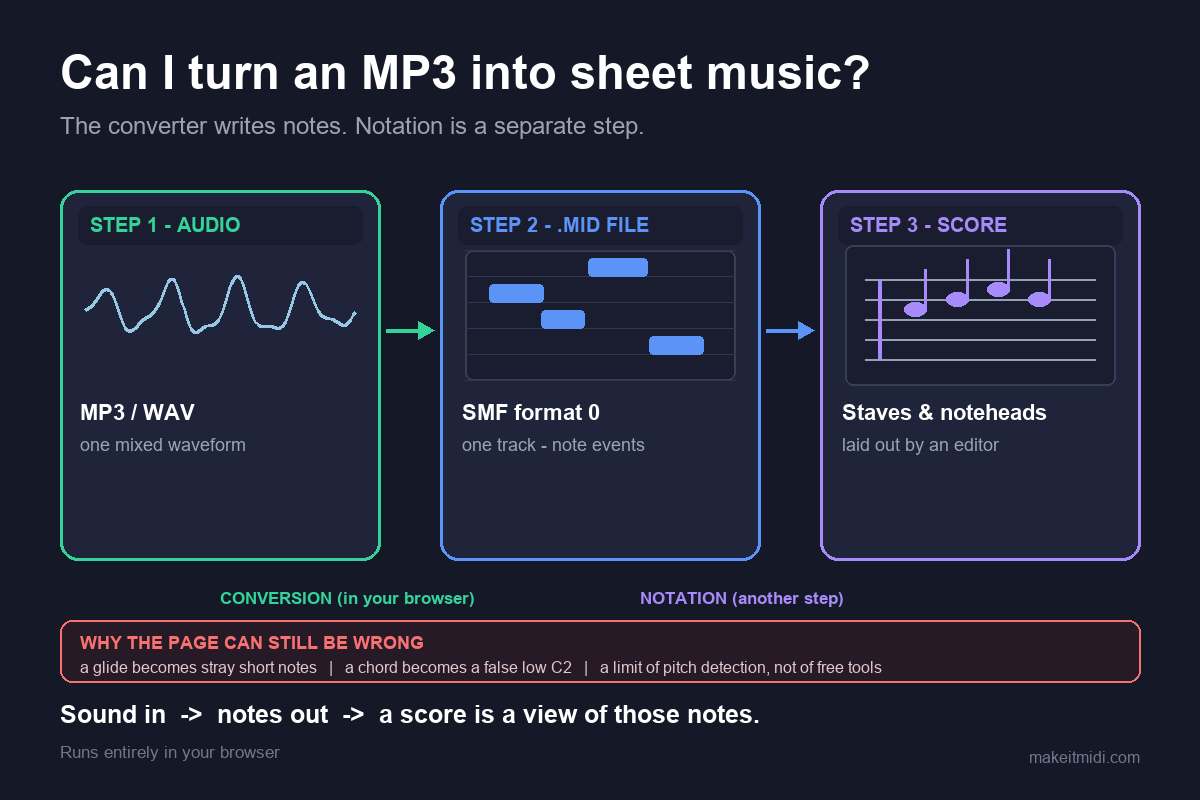
What the converter actually gives you
Drop an MP3 on the converter and you download a Standard MIDI File (SMF) format 0: one track, 480 ticks per quarter note, at 120 BPM. It holds note events — a note number, a start time and a duration for each — and nothing else. There are no staves, no clefs, no barlines, no noteheads and no key signature. It is a list of instructions, not a page of music. We do not export a formatted score, MusicXML, a PDF or guitar tab.
Everything that produces that list runs inside your browser: the audio is decoded locally and the pitch is detected locally, the audio never leaves your device, there is no upload, no account and no login, and you download the .mid directly. MP3, WAV, OGG, M4A/AAC and FLAC all take the same path. The code sets no file-length or file-size limit — only your device memory does. What it transcribes is a single melodic line, not a chord-by-chord or instrument-by-instrument separation. We publish no accuracy percentage, because the result depends entirely on the recording you feed in; any single number would be a guess.
Why MIDI is not notation
This is the distinction that most pages about "MP3 to sheet music" skip. A MIDI note event says "start playing note 64 at this time, stop at that time". A written score is a laid-out interpretation of a set of such events: someone or something decides the key signature, the time signature, where the barlines fall, how notes are beamed, which of two enharmonic spellings to use (C sharp or D flat), how many voices share a staff, and where the rests go. None of those decisions exist in the audio. They are editorial choices made at engraving time, which is why the same .mid can be rendered as several different-looking scores.
There is a practical consequence. A finished MP3 is already a flattened mix — the vocals, guitars, bass, drums, room and effects have been summed into one waveform. There is no hidden set of parts to peel off. So what comes back is one line, roughly the most prominent one, on one track. If you were hoping for a conductor's score or a four-part arrangement, that is not what this conversion produces, and no amount of re-formatting a single-track file will invent the missing parts. For a broader look at the direction of the job, see what audio to MIDI means.
The tempo is worth flagging too. Our file is written at 120 BPM by construction; it does not carry the original song's tempo map. A notation editor will lay the notes out at whatever tempo it reads from the file, so the barlines and note values on the page are a rendering of that fixed grid, not a recovered fact about the performance. If the original was a slow ballad, expect to set the tempo yourself before the notation looks right.
Why the notes on the page can still be wrong
Suppose you import the file cleanly and the editor draws a beautiful staff. It can still show a run of tiny alternating notes where you expected one sustained pitch, or a low note nobody played. Both have the same root cause, and it is not the notation step.
MIDI note numbers are whole semitones. During a pitch bend, slide, ornament or vibrato, the true fundamental frequency travels continuously between semitones. A pitch detector has to round each short analysis frame to the nearest note, so frames inside a bend get written down as the "wrong" notes — that little cluster of neighbours on the staff is one gliding pitch chopped into semitone-sized pieces. Microtonal material is pulled onto the nearest semitone for the same reason, because it falls outside the twelve-tone grid entirely. Even when a converter writes proper pitch bend events alongside the notes, the note layer still had to commit to a base semitone first; bending a wrong note smoothly leaves you with a smoothly wrong note.
This is worst on guitar bends and wide vibrato, vocal slides and melisma, string vibrato, blues and soul phrasing, and microtonal music, where pitch motion is the whole point of the performance. It is nearly absent on clean, isolated piano single notes and a steady synth lead, where the pitch sits still. The other classic surprise is a bogus bass note. A just-intoned major triad sits at the ratio 4 : 5 : 6: C4 (261.63 Hz), E4 (329.63 Hz) and G4 (392.00 Hz) are all close to integer multiples of 65.4 Hz (divide by 4, 5 and 6 respectively), so the combined waveform repeats roughly once every 1/65.4 s. A period-based detector locks onto that shared repetition and reports about 65.4 Hz — C2, two octaves below the lowest note actually played. On a staff that appears as a stray low C under the melody. It is not random noise; it is the arithmetic of three real notes overlapping.
One thing worth being blunt about: this is a limit of pitch detection itself, not a "free tools are worse" problem. In community threads about converters, the recurring complaint is that pitch bends make the output sound out of tune — not that the tool was free. People describe the same drift on paid converters costing around $80. If you are choosing a tool, the useful question is how it lets you handle bends, not whether it charges or whether it prints a score for you.
Practical handling, before and after the score appears: look at the detector's spectrogram for where notes glide or carry grace notes and correct those positions by hand, choose a cleaner source, use a single-note-mode editor for the awkward phrases, and accept that a bend-heavy take is a draft rather than a finished transcription. On the page itself the fix is usually to delete the stray short notes, join them into one longer note, and redraw the phrase. A clean single-line source gives the detector one pitch to follow; a dense, bent mix gives it several competing ones.
The route that works everywhere
The reliable sequence is short and does not depend on any one program:
- Get the
.midfirst. Drop the audio on the converter, press Convert to MIDI, then Download .mid. This is the only step that needs the original audio. - Import that
.midinto your notation editor, DAW or piano-roll view. The editor lays the note events out on a staff and adds the barlines, clef and spelling. If you want printed notation, export it from there. - Clean up by eye. Join the stray short notes, fix the enharmonic spelling and beaming, set the tempo to the song's real one, and check the low register for that false bass note.
- If you need more than one part, split first. Isolate the voices into separate stems, convert each single line on its own pass, then stack the resulting MIDI tracks in the editor. Several clean monophonic passes beat one messy polyphonic guess every time.
We deliberately do not claim that any particular program does or does not offer audio-to-MIDI conversion built in, or that it engraves a .mid in a specific way. We have not verified that against an official source for every version, and guessing about someone else's feature list would be worse than giving you a route that works everywhere. The step that always holds is the same: convert the audio to a .mid file first, then import that file. Once the notes are in your editor, the staff and the piano roll are where you rebuild the phrase.