← Back to the MP3 to MIDI converter
Can I convert MIDI to MP3 without changing the sound?
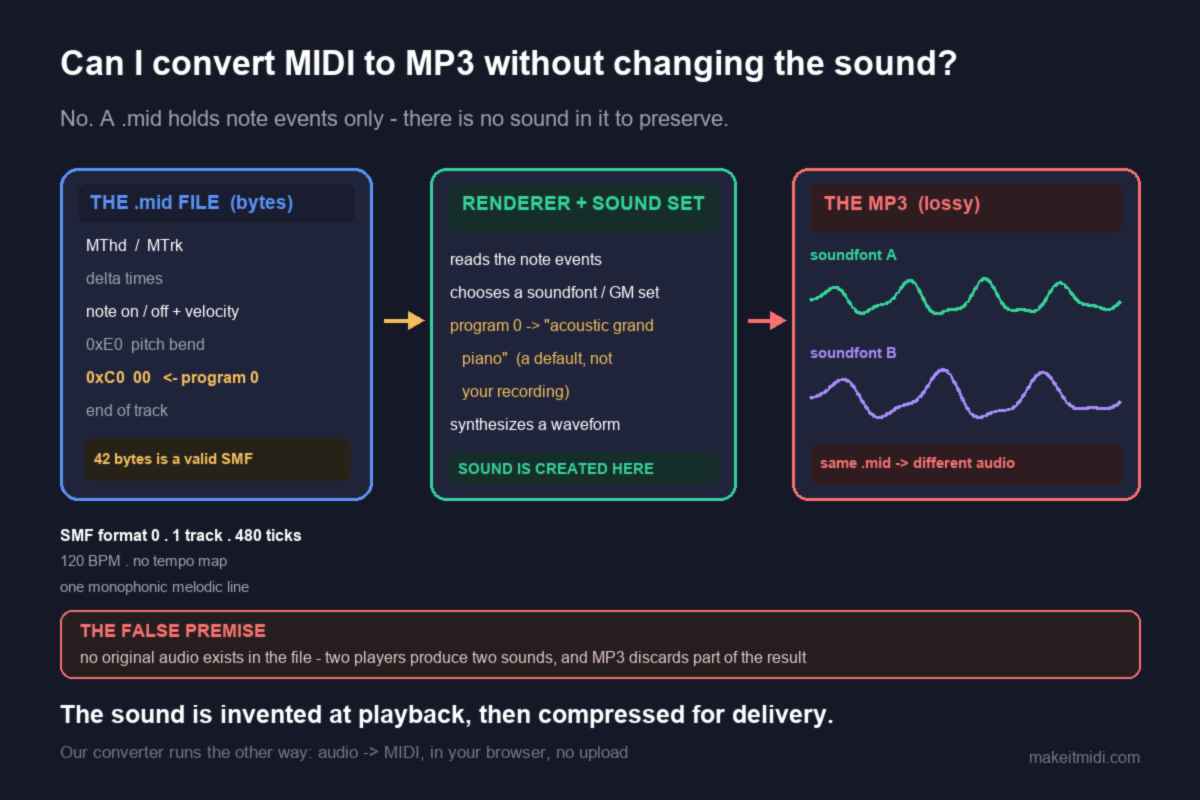
No — a .mid file holds note events, not audio, so there is no sound in it to keep unchanged. Whatever you hear is synthesized later by a sound set the player chooses, then encoded lossily into MP3; the “sound” was never in the file to begin with.
There is no sound inside a MIDI file to preserve
The question assumes there is a “sound” sitting inside the .mid that a conversion might damage. There isn't. A Standard MIDI File is a list of instructions: a note-on event with a pitch number and a velocity, a note-off event, timing data on a grid, and events such as pitch bend. The file this site produces is SMF format 0, one track, 480 ticks per quarter note, written at a fixed 120 BPM. It holds no waveform, no samples and no record of what the instrument actually sounded like.
That is why these files are tiny. On one test machine a valid, single-track, type-0 SMF was 42 bytes — small enough to hold in a sentence, yet complete enough that a player parsed it correctly (the measured result). So when you ask for MIDI to MP3, you are not asking to repackage existing audio. You are asking a program to make audio from a note list, and then to write it into a lossy container. Those are two creation steps, not one copy step. “Without changing the sound” has no reference point, because no sound was recorded in the first place.
Going from .mid to MP3 is unavoidably two stages. First a renderer reads the events and synthesizes a waveform using a sound set. Then that waveform is encoded into MP3, which is a lossy format: it discards audio data by design to make the file smaller. Even a “high quality” export is a fresh synthesis followed by a lossy encode. The last step removes some of what the first step just made. If by “the sound” you mean the timbre of your original recording, it was never written into the .mid; if you mean the sound of a particular playback, that belongs to the sound set and the encoder, and changing either changes it. The only thing that survives every render intact is the note list itself — which is precisely what MIDI is for. Keep the original audio file if you need the sound; keep the .mid if you need the notes.
The one instrument byte in the file is a default, not your recording
There is a detail here that almost no answer to this question mentions, and you can read it straight out of the converter on this site. The detection pipeline estimates notes and writes exactly two kinds of things: addNote({midi, time, duration, velocity: amplitude}) for each detected note and addPitchBend({time, value}) for each glide. It never identifies the instrument. A pitch detector returns a frequency and an amplitude; it has no way to know whether that came from a guitar, a voice or a violin, and it does not try.
But a Standard MIDI File has a slot for an instrument: a program change event (status 0xC0 on the channel, followed by one program-number byte). The file writer on this site always emits one at tick 0 for each track, taking the number from the track's instrument object — and that object defaults to program 0. In the General MIDI patch list bundled with the writer, program 0 is “acoustic grand piano.” So every .mid this converter writes quietly says “play me as a piano,” even if your source was a distorted guitar riff, a sung melody or a drum loop.
That byte is a default value written by the library, not a fact recovered from your recording. And it does not fix the sound anyway: a program number is just an index into whatever sound set the player happens to have loaded. Play the same file through two different soundfonts and you get two different “pianos.” Play it with no soundfont installed and, as measured on one machine, the render comes out as a 0-byte WAV — the note events were parsed fine, but there was nothing to turn them into sound. The instrument is a choice made at playback, not a property stored in the file.
This is also why searches like midi to mp3 converter with soundfont and midi to wav with soundfont exist: people have noticed that the sound is supplied from outside the file and want some control over it. Choosing a better sound set genuinely changes what you hear. It just isn't preserving anything, because there was nothing there to preserve. For more on the playback side, see why MIDI carries no audio and how a MIDI file becomes a WAV.
So the honest answer to convert midi to mp3 without changing sound is that the phrase describes an operation that cannot exist: there is no original audio in the file to protect from change.
Why a converted .mid already sounds “different” before you render it
If your .mid came from an MP3 — which is the common case behind this question — there is a second, more important reason it will never sound like the source, and it happened before any of the steps above. Audio-to-MIDI is a measurement, and the measurement is lossy in a very specific way.
During a pitch bend, slide, vibrato or ornament, the true fundamental frequency moves continuously between semitones. A detector that commits one note per frame has to round each instantaneous value to the nearest of twelve equal-tempered pitches, so one sustained gliding note becomes a short staircase of neighbouring semitones. Microtonal material gets pulled onto the nearest step for the same reason. This is worst on guitar bends and wide vibrato, vocal slides and melisma, bowed-string vibrato, blues and soul phrasing, and microtonal music; it is nearly absent on clean, isolated piano single notes and a steady synth lead. That is why MP3 to MIDI sounds out of tune, and it is a limit of pitch detection, not a symptom of a free converter or a cheap soundfont.
Dense material produces the classic phantom bass. A just-intoned major triad sits at the ratio 4 : 5 : 6: C4 (261.63 Hz), E4 (329.63 Hz) and G4 (392.00 Hz) are all close to integer multiples of 65.4 Hz (divide by 4, 5 and 6), so the combined waveform repeats roughly once every 1/65.4 s. A period-based detector can lock onto that shared repetition and report about 65.4 Hz — C2, two octaves below the lowest note actually played. Rendering that file through a beautiful piano soundfont simply gives you a very convincing wrong bass note. No sound set, bitrate or export setting can restore a glide that was rounded into semitones, because the decision was made at detection, before the file existed.
The practical route is therefore to work on the source, not the render: read the spectrogram for where notes bend or carry grace notes and correct those positions by hand, pick the cleanest take you can, use a single-note or monophonic editor mode if you have one, and accept that bend-heavy material comes out as a draft. We publish no accuracy percentage because any single number would be a guess about your recording. In producer communities the recurring complaint is that bends and slides make the output drift, not that the tool was free; the same drift gets reported on paid converters costing around $80. Choose a tool by how it handles bends, not by what it charges — and no MP3 export setting changes which bends it chose to measure.
Which direction does this converter run?
The tool on this site runs the opposite direction from the one in the question: it takes an audio file and gives you a .mid. It is not a MIDI-to-MP3 renderer, and we do not offer one here. Decoding and pitch detection both run locally in your browser, the audio never leaves your device, there is no upload, no account and no login, and you download the .mid directly. The browser itself decodes MP3, WAV, OGG, M4A/AAC and FLAC; the code contains no check on file length or size, so the practical ceiling is your device's memory. It extracts one monophonic melodic line, not instrument-by-instrument or chord-by-chord separation. Output is SMF format 0, one track, 480 ticks per quarter note, at a fixed 120 BPM with no tempo map.
We deliberately do not claim that any particular DAW, media player or converter does or does not have MIDI-to-audio rendering built in, or which soundfont it ships with. We have not verified every product's current feature list against its own official documentation, and guessing at someone else's features would be worse than giving a route that holds everywhere: render the .mid to a WAV with a sound set first, then encode that audio to MP3 in whatever encoder you already use. That two-stage shape is a property of the formats, not a claim about one product. This converter has no batch mode, no account, no queue and no conversion history — it is one file at a time, in your browser.
Short questions, short answers
Will a better soundfont fix notes that sound wrong? No. A sound set changes timbre, not the note events. If a glide was rounded into a cluster of semitones or a chord became a phantom C2, a nicer piano sample plays those same wrong notes more convincingly. Fix the detection, the source, or the events in an editor.
Does the .mid remember which instrument I recorded? No. The writer on this site never identifies an instrument; it emits a program change byte that defaults to program 0 (acoustic grand piano) for every track. That is a library default, not a measurement of your guitar, voice or strings.
So can I get my exact original sound back from a .mid? No, and no export setting will change that. MIDI stores notes and timing, not audio. Keep the original audio file alongside the .mid if you need to listen back against the source.