← Back to the MP3 to MIDI converter
Can I edit the notes after converting an MP3 to MIDI?
Yes — the .mid opens in any MIDI or piano-roll editor as one editable track of note events. But an editor edits events, not audio: it can move, delete or rewrite the notes the detector already committed, and it cannot re-listen to your recording, restore a slide that was rounded into semitones, or split one melodic line back into separate instruments.
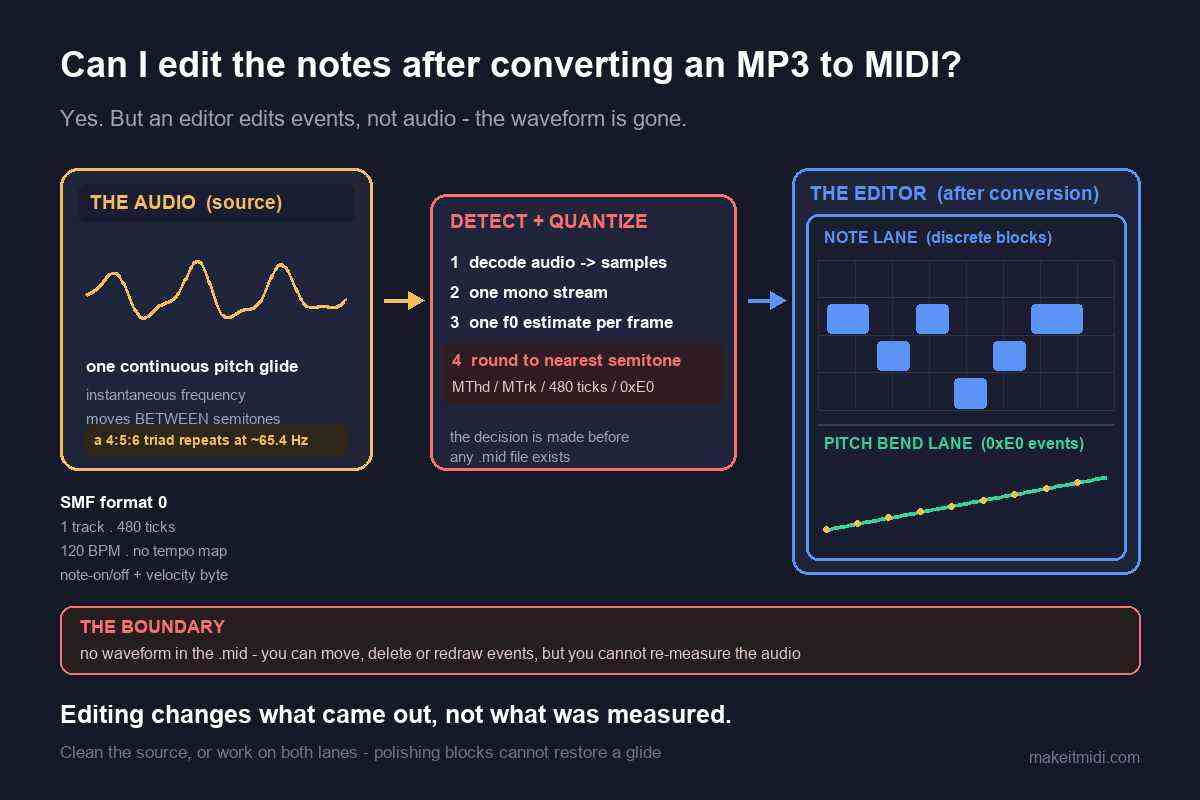
What you actually get to edit
The file you download is a Standard MIDI File (SMF) format 0: one track, 480 ticks per quarter note, written at a fixed 120 BPM. When an editor opens it, there is no waveform to show you and no reference back to the MP3. What you are looking at is a list of events on a time grid.
You can read the exact shape of that list in the converter on this site. Each detected note is written with a note number, a start time, a duration and a velocity taken from the detected amplitude (addNote({midi, time, duration, velocity: amplitude})), and each glide adds its own bend values (addPitchBend({time, value})). The file writer serializes note-on and note-off with a status byte and a single velocity byte, and writes pitch bend events as status 0xE0 with a 14-bit value split into two bytes around a centre of 8192. So "editing" here means something quite literal: changing a number, sliding an event along the tick grid, deleting an event, or drawing a new one by hand. It does not mean tuning a sound, because no sound is stored in the file.
That is worth stating plainly for the searches behind this question — mp3 to midi editor, audio to midi editor, mp3 to midi piano roll. A piano roll is a view of the discrete note layer. It is a very good view for arranging and a misleading one for judging whether a conversion was right, because the other half of the pitch information is not drawn as note blocks at all.
Why editing cannot fix out-of-tune notes
During a pitch bend, slide, vibrato or ornament, the true fundamental frequency moves continuously between semitones. A detector that commits one note per frame has to round each instantaneous value to the nearest of twelve equal-tempered pitches, so one sustained gliding note becomes a small cluster of neighbouring semitones. Microtonal material is pulled onto the nearest step for the same reason. This is worst on guitar bends and wide vibrato, vocal slides and melisma, string vibrato, blues and soul phrasing, and microtonal music; it is nearly absent on clean, isolated piano single notes and a steady synth lead.
Dense backing produces the classic phantom bass. A just-intoned major triad sits at the ratio 4 : 5 : 6: C4 (261.63 Hz), E4 (329.63 Hz) and G4 (392.00 Hz) are all close to integer multiples of 65.4 Hz (divide by 4, 5 and 6), so the combined waveform repeats roughly once every 1/65.4 s. A period-based detector locks onto that shared repetition and reports about 65.4 Hz — C2, two octaves below the lowest note actually played. Three real notes overlapping become one wrong one.
Now notice when those errors happen. They are measurement decisions taken before the file existed. An editor opens the file afterwards, so it inherits the decision; it cannot revisit it. Deleting a stray semitone tidies the display, but it does not recover the continuous glide that was rounded away. Lifting a phantom C2 up two octaves gives you a plausible note, not the three voices that were really there. In both cases you are replacing one guess with another, using your ear as the detector.
There is a second, quieter trap. Because the writer emits pitch bend events alongside note events, the output carries two layers: discrete note numbers and a continuous bend curve. Most piano-roll grids draw the note blocks; the bend data sits in a separate controller lane underneath. If you only look at the blocks, a slide looks like a run of wrong notes even though the bend information is in the file. That is a limitation of quantizing and displaying pitch, not a corrupt conversion — and it is why "fixing the notes" often means working on both lanes, or on neither.
None of this tracks with price, and we publish no accuracy percentage because any single number would be a guess about your recording. In producer communities the recurring complaint is that bends and slides make the output sound out of tune, not that the tool was free; people describe the same drift on paid converters costing around $80. Choosing a tool by how it handles bends beats choosing it by what it charges, and no amount of editing afterwards changes which bends it chose to measure.
What an editor genuinely buys you
Here is the part a fair answer has to concede: an editor is the right place for a lot of real work. You can delete the stray short notes left by a quantized glide and leave one longer note, then redraw a bend curve so the slide is continuous again. You can nudge or quantize timing on the tick grid, transpose a whole run that sits a semitone off, delete or lift that phantom bass note, shape velocity, split or merge notes, and revoice the line onto a different instrument. For arrangement and cleanup, an editor beats a converter hands down.
The boundary is that an editor can only work with events that exist. This converter extracts a single monophonic melodic line, not instrument-by-instrument or chord-by-chord separation, so the other voices were never written as events in the first place. An editor cannot split one note back into the three that produced it, cannot add a harmony that was never detected, and cannot invent the timbre of the original recording, because MIDI carries no audio. It is excellent at notation and arrangement cleanup and useless at re-detection.
That leads to a practical rule that saves a lot of time: if the source is the problem, re-convert from a cleaner source instead of spending an hour polishing wrong notes. A solo take over a full mix, or a take with fewer slides, changes what the detector had to work with. Editing changes only what came out. Those are different levers, and the first one reaches further.
A workflow that works in any editor
- Convert the audio to a
.midfirst. Drop the file on the converter, press Convert to MIDI, then Download .mid. Decoding and pitch detection both run locally in your browser, the audio never leaves your device, there is no upload, no account and no login. MP3, WAV, OGG, M4A/AAC and FLAC are decoded by the browser itself, and the code contains no check on file length or size, so the practical ceiling is your device's memory. The output is SMF format 0, one track, 480 ticks per quarter note, at a fixed 120 BPM with no tempo map — one monophonic melodic line. - Set the tempo before you quantize or align anything. 120 BPM is a constant written into the file, not an estimate of the song's speed. Match your project to the real tempo first, otherwise the tick grid you are editing against is the wrong grid.
- Open the
.midin whatever MIDI or piano-roll editor you use, and look at both lanes. The note blocks are one layer; pitch bend or controller data is another. If a phrase looks like a run of wrong notes, check whether a continuous curve is already underneath it before you start deleting blocks. - Correct by hand where the source glides. Read the spectrogram for where notes bend or carry grace notes and fix those positions, use a single-note or monophonic mode if your editor has one, and pick the cleanest source you can. Cleaning the source beats cleaning the output.
- Treat bend-heavy material as a draft. Guitar bends, vocal melisma and wide vibrato will need manual work in any pipeline, free or paid, browser-based or scripted. That is the nature of the measurement, not a defect an editor can remove.
We deliberately do not claim that any particular DAW, notation program or editor does or does not have audio-to-MIDI conversion built in, or that it displays bend data in a specific way. We have not verified every product's current feature list against its own official documentation, and guessing at someone else's features would be worse than giving a route that holds everywhere: convert the audio to a .mid first, then import that file into whatever you already use. We publish no accuracy percentage. This converter has no batch mode, no account, no queue and no conversion history — it is one file at a time, in your browser.
Short questions, short answers
Can I fix out-of-tune notes in the piano roll instead of reconverting? You can move or delete the offending blocks, but you are then substituting your ear for the detector one note at a time. If the source is full of bends, reconverting from a cleaner take — or editing the bend curve alongside the notes — gets closer than polishing a staircase of rounded semitones.
Does the .mid keep the original audio so I can compare while editing? No. A Standard MIDI File carries events and timing, not samples; there is no waveform inside it. Keep the original MP3 open alongside the editor if you need to listen back against the source.
Can an editor turn the single line back into separate instruments? No. The converter extracts one monophonic melodic line, so the other voices were never written as events. An editor can only rearrange events that exist; recovering a full arrangement means a different recording or a different transcription approach.